
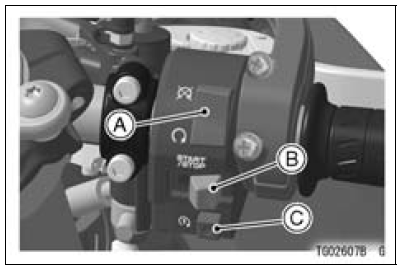
A. Engine Stop Switch
B. START/STOP Switch (for Stop Watch)
C. Starter Button
In addition to the ignition switch,
the engine stop switch must be in
the
position for the motorcycle to
operate.
The engine stop switch is for emergency
use. If required, move the switch
to the position.
NOTE
Although the engine stop switch stops the engine, it does not turn off all the electrical circuits. Ordinarily, the ignition switch should be used to stop the engine.
 Starter Button
Exhaust Pipe Removal
Remove:
Radiator (see Radiator and Radiator Fan Removal in the
Cooling System chapter)
Exhaust Pipe Clamp Bolt [A] (Loosen)
Remove the exhaust pipe holder nuts [A], and pull out the
exhaust pipe [B] forward from the premuffler chamber.
...
Headlight Bulb Replacement
Turn the cover [A] counterclockwise, and remove it.
Disconnect the headlight connector [A].
Open the clamp [B], and remove the bulb.
NOTICE
When handling the quartz-halogen bulb, never
touch the glass portion with bare hands. Always
use a clean cloth. Oil contamination from hand ...
Headlight Aiming Adjustment
NOTE
Do not turn the bolts [A] because the reflector in the
headlight comes off.
(In the photo, the headlight unit has been removed for
clarity.)
NOTE
The left adjuster [A] and right adjuster [B] can move the
direction of the headlight beam to up, down, left and
right by turning each a ...
