
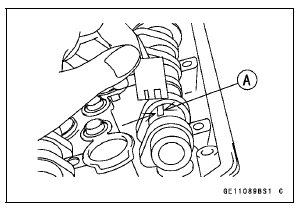
Place a strip on each journal parallel to the camshaft installed in the correct position.
NOTE
Do not turn the camshaft when the plastigage is between the journal and camshaft cap.
Camshaft Journal/Camshaft Cap Clearance Standard: 0.038 ∼ 0.081 mm (0.0015 ∼ 0.0032 in.) Service Limit: 0.17 mm (0.0067 in.)
If any clearance exceeds the service limit, measure the diameter of each camshaft journal with a micrometer.
Camshaft Journal Diameter Standard: 23.940 ∼ 23.962 mm (0.9425 ∼ 0.9434 in.) Service Limit: 23.91 mm (0.9413 in.)
If the camshaft journal diameter is less than the service limit, replace the camshaft with a new one and measure the clearance again.
If the clearance still remains out of the service limit, replace the cylinder head unit.
 Camshaft Installation
 Camshaft Runout Inspection
Front Forks/Rear Shock Absorber Operation Inspection
Pump the forks down and up [A] 4 or 5 times, and inspect
the smooth stroke.
If the forks do not smoothly or noise is found, inspect the
fork oil level or fork clamps (see Front Fork Oil Change in
the Suspension chapter).
Pump the rear seat down and up [A] 4 or 5 times, and
inspec ...
Gear Position Switch Output Voltage Inspection
NOTE
Be sure the battery is fully charged.
Turn the ignition switch to OFF.
Remove the fuel tank (see Fuel Tank Removal in the Fuel
System (DFI) chapter).
Disconnect the sidestand switch/gear position switch lead
connector [A].
Connect the measuring adapter [A] between the ...
Clock
To adjust hours and minutes, do the
followings while the motorcycle is at a
stop.
Turn the ignition switch to “ON�.
Display the odometer in the multifunction
display. Refer to the “Multifunction
Display� item in this section.
Push the lower button for more than
2 seconds. Bot ...