
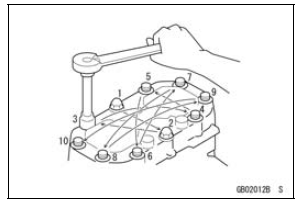
Generally, when installing a part with several bolts, nuts, or screws, start them all in their holes and tighten them to a snug fit. Then tighten them according to the specified sequence to prevent case warpage or deformation which can lead to malfunction. Conversely when loosening the bolts, nuts, or screws, first loosen all of them by about a quarter turn and then remove them. If the specified tightening sequence is not indicated, tighten the fasteners alternating diagonally.
Tightening Torque
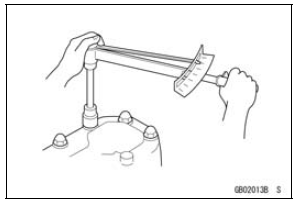
Incorrect torque applied to a bolt, nut, or screw may lead to serious damage. Tighten fasteners to the specified torque using a good quality torque wrench.
 Replacement Parts
 Force
ForceInner Tube Inspection
Visually inspect the inner tube [A].
If there is any damage, replace the inner tube. Since
damage to the inner tube damages the oil seal, replace
the oil seal whenever the inner tube is replaced.
NOTICE
If the inner tube is badly bent or creased, replace
it. Excessive bending, followed by ...
Stop Watch
The stop watch can be used in closed
course competition.
The stop watch is operated as follows:
Push the upper button to display the
stop watch.
To start the stop watch, push the
“START/STOP� switch on the right
handlebar switch to the left.
A. “START/STOP� Switch
...
Rider’s Seat Installation
Insert the tabs on the front of the
rider’s seat into the slots in the frame
and secure the seat with mounting
bolts.
Install the seat cover and bolts.
A. Rider’s Seat
B. Tabs
C. Slots
D. Stays ...