
The gear position indicator shows the corresponding gear positions where the transmission is shifted.
For example, when the transmission is in 6th gear, “6� is displayed.
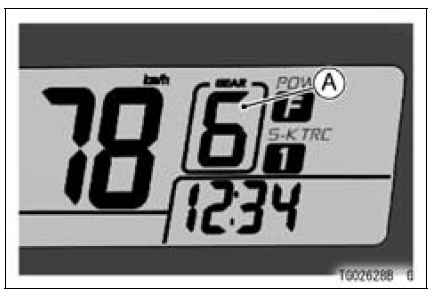
A. Gear Position Indicator (Normal mode)
NOTE
If the gear position is in the neutral position, the gear position is disappears and the neutral indicator light goes on.
 Intake Air Temperature Meter
 Race Mode Display
Compression Damping Force Adjuster and Rebound
Damping Force Adjuster Adjustment
The compression damping force adjuster
and the rebound damping force
adjuster are located on top of each front
fork leg.
Turn the adjuster clockwise with a
screwdriver to increase damping
force.
Turn the adjuster counterclockwise
to decrease damping force.
NOTICE
Do not force to t ...
Rebound Damping Force Adjustment
To adjust the rebound damping force, turn the rebound
damping adjuster [A].
The standard adjuster setting is the 3 3/4 turns out from
the fully clockwise position.
WARNINGIf both adjusters are not adjusted
equally, handling
may be impaired and a hazardous condition may
res ...
Brake Pad Wear Inspection
Remove the brake pads (see Front/Rear Brake Pad Removal
in the Brakes chapter).
Check the lining thickness [A] of the pads in each caliper.
If the lining thickness of either pad is less than the service
limit [B], replace both pads in the caliper as a set.
Front Brake Pad [C]
Rea ...