
The Power mode determines the engine power output characteristics and has three settings.
The S-KTRC and the Power mode can be set separately. By combining each setting, the rider can get various power feelings to suit riding conditions or individual preference.
Mode F (Full Power):
The highest engine power output is achieved. The rider can feel the full throttle response of the engine.
Mode M (Middle Power):
The throttle response is less sharp compared to the mode F.
Depending throttle application full power can be accessed temporarily.
Mode L (Low Power):
About 60% of the highest engine power output is achieved. The throttle response is mildest among the three modes.
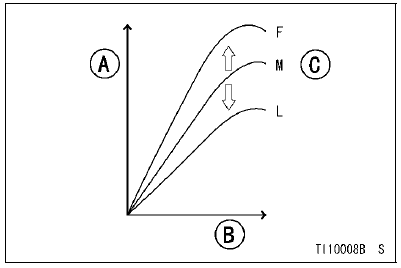
A. Power
B. Engine rpm
C. Depending on Throttle Angle
Power mode Button
For the power mode setting, use the power mode button on the left handlebar switch.
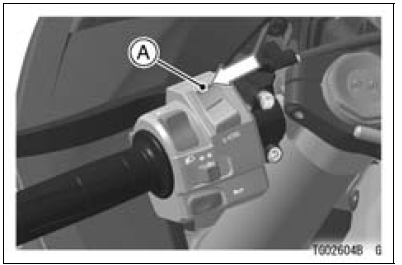
A. Power mode Button (Upper Part)
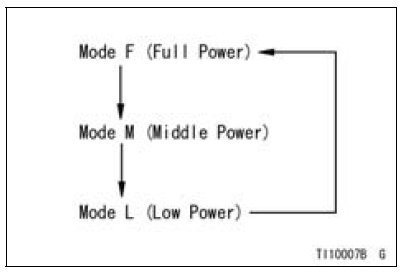
Power mode setting
Themode can be changed only when the throttle grip is closed completely.
NOTE
When changing the mode, stop the motorcycle.
 0.4
0.4
NOTE
 Sport-kawasaki traction control (s-ktrc)
 Safe operation
Gear Position Switch Installation
Securely place the springs [A] and pins [B] into the holes
[C] of the shift drum.
Apply grease to the new O-ring [D].
Install the gear position switch [E].
Apply a non-permanent locking agent to the threads of
the gear position switch screws [F].
Tighten:
Torque - Gear Position Swit ...
KIBS Warning Indicator Light (For models equipped
with KIBS)
The yellow warning indicator light in
the meter unit functions as the KIBS
warning indicator light. The yellow
warning indicator light and warning
symbol “KIBS� go on if there is a malfunction
in the KIBS system. When the
warning light is on, the KIBS system
stops functioning. However, th ...
Check 3-1: CAN Communication Line Resistance Inspection
Set the hand tester [A] to the ×1 Ω range and connect it
to the terminal [11] and [12] in the meter unit.
Special Tool - Hand Tester: 57001-1394
CAN Communication Line Resistance (at Meter Unit)
Standard: 122 126 Ω
If the tester reading is not specified, replace the meter ...