
The self-diagnosis system is monitoring the following mechanisms.
DFI System and Ignition System
S-KTRC System
Immobilizer System (Equipped Models)
KIBS and ABS (Equipped Models)
ESD (Electronic Steering Damper) System
(ZX1000JD/KD)
The following warning indicator lights (LED) are used for
symbols of below table.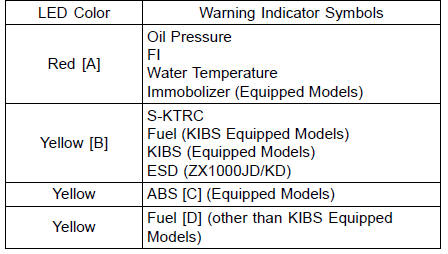
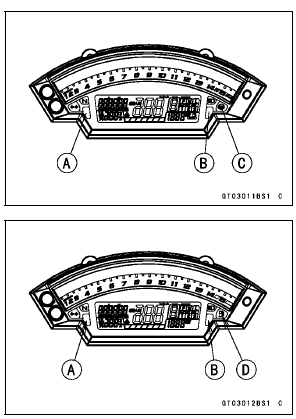
The self-diagnosis system has two modes and can be switched to another mode by operating the meter unit.
User Mode
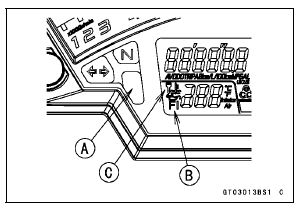
The ECU notifies the rider of troubles in DFI system, ignition system, S-KTRC system and immobilizer system (equipped models) by lighting or blinking the warning indicator light (LED) [A], FI warning symbol [B] and immobilizer warning symbol [C] when DFI, ignition, S-KTRC and immobilizer system parts are faulty, and initiates fail-safe function. In case of serious troubles, ECU stops the injection and ignition operations.
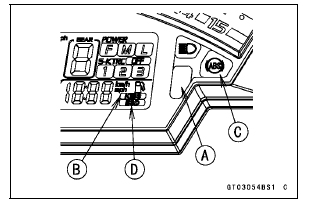
For KIBS and ABS system (equipped models), the KIBS hydraulic unit notifies the rider of troubles in KIBS and ABS system by lighting or blinking the red warning indicator light (LED) [A], KIBS warning symbol [B] and ABS indicator light (LED) [C] when KIBS and ABS parts are faulty, and initiates fail-safe function.
For ESD system (ZX1000JD/KD), the ESD ECU notifies the rider of troubles in ESD system by lighting the yellow warning indicator light (LED) and ESD warning symbol [D] when ESD parts are faulty, and initiates fail-safe function.
Dealer Mode
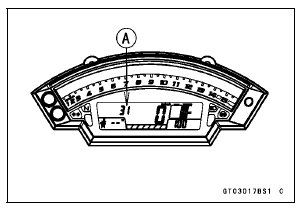
The LCD (Liquid Crystal Display) displays the service code(s) [A] to show the problem(s) which the above system has at the moment of diagnosis.
 Self-Diagnosis
 Self-Diagnosis Procedures
DFI Power Source
ECU Fuse Removal
Refer to the 30 A Main/15 A ECU Fuse Removal in the
Electrical System chapter.
ECU Fuse Installation
If a fuse fails during operation, inspect the DFI system to
determine the cause, and then replace it with a new fuse
of proper amperage.
Refer to the Fuse Installation in ...
Special Tools and Sealant
Hand Tester:
57001-1394
Flywheel Puller Assembly, M38 × 1.5/M35 × 1.5:
57001-1405
Peak Voltage Adapter:
57001-1415
Lead Wire - Peak Voltage Adapter:
57001-1449
Key Registration Unit:
57001-1582
Grip:
57001-1591
Flywheel & Pulley Holder:
57001-1605
Rotor Holder:
...
Front Brake Pad Installation
Check that the pad spring [A] is in place on the caliper.
Push the caliper pistons in by hand as far as they will go.
Install the brake pads [A] on the pad spring correctly.
Fit the pad into the groove of the caliper as shown in the
figure.
Install the pad pins while pushing t ...