
The rider can choose from three engine power modes to suit their preferences and road conditions.
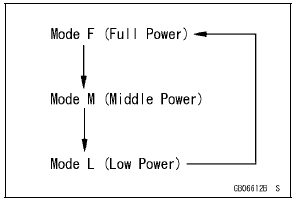
The FI ECU controls the engine power by adjusting fuel injection, air intake, and ignition timing. It enables three-mode selection: Full Power (Mode F), Middle Power (Mode M), and Low Power (Mode L).
In addition, combining each mode with each S-KTRC setting allows the rider to have more choices to be able to interact with various conditions.
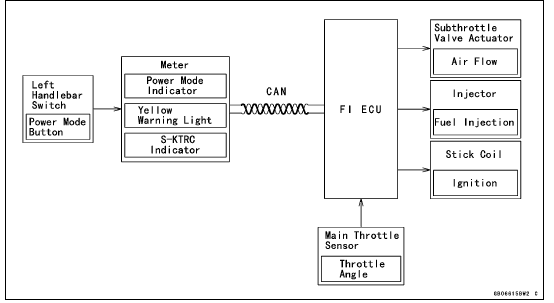
Power Mode Operation
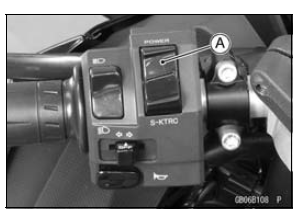
To change the mode, close the throttle grip completely,
and depress the power mode button [A] (0.3
 0.4 sec.).
Power Mode Positions
NOTE
The power mode setting is maintained when the ignition switch is turned OFF, or when the battery is disconnected.
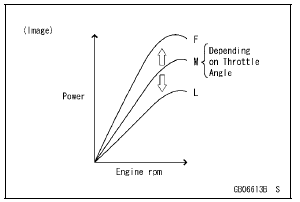
Mode F: The highest engine power output is achieved. The rider can use the full power of the engine.
Mode M: The throttle response is less sharp compared to mode F. Depending on the throttle application, full power can be accessed temporarily.
Mode L: About 60% of the highest engine power output is achieved. The throttle response is mildest among the three modes.
The current mode selection is displayed on the power mode indicator [A] in the multifunction meter.
If a failure occurs with a FI related components such as a subthrottle or main throttle sensor, the warning indicator light (red LED) and FI warning symbol will go ON, and/or the S-KTRC indicator [B] and warning indicator light (yellow LED) [C] blink. The current mode cannot be changed at this time.
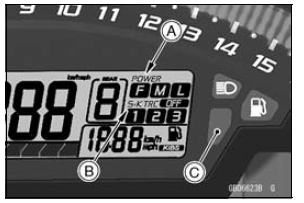
 Mode-switching
Turn Signal Relay Inspection
Remove the battery (see Battery Removal).
Take the turn signal relay [A] off the rear fender.
Disconnect the connector [B].
Connect one 12 V battery and turn signal lights as indicated
in the figure, and count how many times the lights
blink for one minute.
Turn Signal Relay ...
Coolant Flow Chart
1. Radiator
2. Radiator Fan
3. Water Pump
4. Oil Cooler
5. Oil Cooler Intake Hose
6. Oil Cooler Outlet Hose
7. Cylinder Jacket
8. Cylinder Head Jacket
9. Thermostat Housing
10. Air Bleeder Hose
11. Radiator Cap
12. Radiator Overflow Hose
13. Reserve Tank
14. Reserve Tank Overflow Ho ...
Regulator/Rectifier Inspection
Remove:
Upper Fairing Assembly (see Upper Fairing Assembly
Removal in the Frame chapter)
Right Inner Fairing (see Inner Fairing Removal in the
Frame chapter)
Bolts [A]
Regulator/Rectifier [B]
Set the hand tester to the × 1 kΩ range and make the
measurements show ...
