
NOTE
Be sure the battery is fully charged.
Harness [B] Water Temperature Sensor [C]
Special Tool - Measuring Adapter: 57001-1700
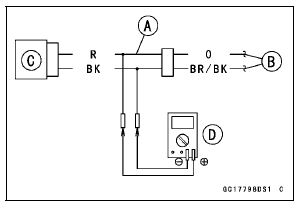
Water Temperature Sensor Output Voltage Connections to Adapter: Digital Meter (+) → R (sensor O) lead Digital Meter (–) → BK (sensor BR/BK) lead
ECU Intake Temperature Sensor Throttle Body Assy Connectors
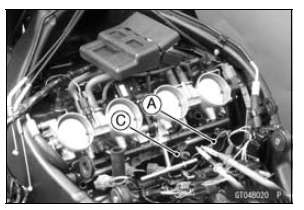
Output Voltage
Standard: About DC 2.80 2.97 V at
20°C (68°F)
NOTE
The output voltage changes according to the coolant temperature in the engine.
If the reading is within the standard, check the ECU for its ground, and power supply (see ECU Power Supply Inspection in the Fuel System (DFI) chapter).
If the ground and power supply are good, replace the ECU (see ECU Removal/Installation in the Fuel System (DFI) chapter).
If the reading is out of the standard, remove the ECU and check the wiring for continuity between harness connectors.
Special Tool - Hand Tester: 57001-1394
Disconnect the ECU and sensor connectors.
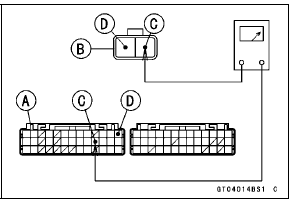
Wiring Continuity Inspection ECU Connector [A] ←→ Water Temperature Sensor Connector [B] O lead (ECU terminal 23) [C] BR/BK lead (ECU terminal 13) [D]
If the wiring is good, check the water temperature sensor resistance (see Water Temperature Sensor Resistance Inspection).
 Water Temperature Sensor Removal/Installation
 Water Temperature Sensor Resistance Inspection
Catalytic Converter
This motorcycle is equipped with a
catalytic converter in the exhaust system.
The converter reacts with carbonmonoxide,
hydrocarbons and nitrogen
oxides to convert them into carbon
dioxide, water, nitrogen and oxygen resulting
in much cleaner exhaust gases
to be discharged into the atmosphe ...
Valve Seat Repair
Repair the valve seat with the valve seat cutters [A].
Special Tools - Valve Seat Cutter Holder Bar [B]: 57001
-1128
Valve Seat Cutter Holder, 4.5 [C]: 57001
-1330
[For Exhaust Valve Seat]
Valve Seat Cutter, 45° - 27.5:
57001-1114
Valve Seat Cutter, 32° - 28:
57001-1119
Valve Seat ...
KIBS Motor Relay Inspection (Service Code b 35)
Check the KIBS motor relay fuse (25 A) [A] (see Fuse
Inspection in the Electrical System chapter)
If the fuse is good, check the wiring continuity as follows.
Disconnect:
Battery Positive Cable (see Battery Removal in the Electrical
System chapter)
KIBS Hydraulic Unit Lead Connector (see ...