
| WARNING Downshifting to a lower gear at high speed causes engine rpm to increase excessively, potentially damaging the engine and it may also cause the rear wheel to skid and cause an accident. |
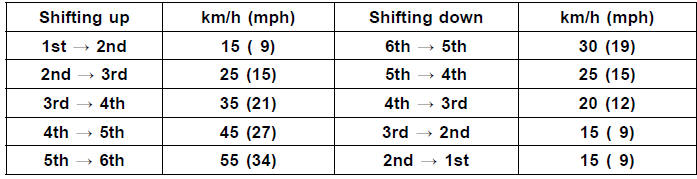
Vehicle speed when shifting
NOTE
The transmission is equipped with a positive neutral finder. When the motorcycle is standing still, the transmission cannot be shifted past neutral from 1st gear. To use the positive neutral finder, shift down to 1st gear, then lift up on the shift pedal while standing still. The transmission will shift only into neutral.
 Moving Off
 Braking
Starter Relay Inspection
Remove the front seat (see Front Seat Removal in the
Frame chapter).
Remove the battery negative (–) cable from the battery
negative (–) terminal (see Battery Removal).
Take the starter relay [A] off the rear fender.
Remove the cover [B].
Remove:
Starter Motor Cable [A] ...
DFI System Troubleshooting Guide
NOTE
This is not an exhaustive list, giving every possible cause for each
problem listed. It is meant
simply as a rough guide to assist the troubleshooting for some of the more
common difficulties in
DFI system.
The ECU may be involved in the DFI electrical and ignition system
tro ...
Exhaust Butterfly Valve Actuator Inspection
NOTE
Be sure the battery is fully charged
Remove the front seat (see Front Seat Removal in the
Frame chapter).
Turn the ignition switch to ON.
In the left side view of the motorcycle, check to see
the pulley [A] clockwise [B] and counterclockwise [C]
smoothly.
The pulley turns ...