
Special Tool - Hand Tester: 57001-1394
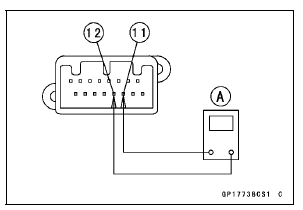
CAN Communication Line Resistance (at Meter Unit)
Standard: 122  126 Ω
126 Ω
If the tester reading is not specified, replace the meter unit.
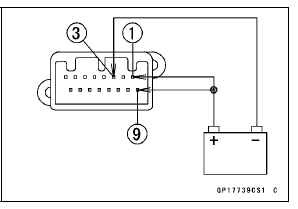
Check 3-2: Meter Unit Power Supply Check
Connect the battery positive (+) terminal to the terminal [1] [9].
Connect the battery negative (–) terminal to the terminal [3].
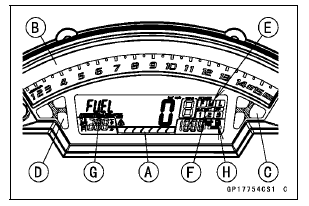
The all LCD segments [A] appear for 3 seconds.
The tachometer (LED) [B] blinks 3 times.
For ZX1000J model, the fuel level warning indicator light (LED) [C] and warning indicator light (Red LED) [D] go on.
For ZX1000K model, the ABS indicator light (LED) [C] and warning indicator light (Red LED) [D] go on.
The following items blinks.
Power Mode Indicator [E] S-KTRC Mode indicator [F] “FUEL� Segment [G] Fuel Level Warning Symbol [H] (ZX1000K model)
 Meter Unit Inspection
 Check 3-3: High Beam Indicator Light (LED) Inspection
Check 3-6: Neutral Indicator Light (LED) Inspection
Connect the leads in the same circuit as Check 3-2.
Connect the terminal [8] to the battery (–) terminal.
Check that the neutral indicator light (LED) [A] goes on.
If the indicator light does not go on, replace the meter unit.
...
Subthrottle Sensor Output Voltage Inspection
Measure the output voltage at the subthrottle sensor in
the same way as input voltage inspection, note the following.
Disconnect the subthrottle sensor connector and connect
the setting adapter [A] between these connectors.
Special Tool - Throttle Sensor Setting Adapter: 57001
-1538
...
Caliper Installation
Install the caliper and brake hose lower end.
For the front caliper, be sure to install the collars [A].
Replace the washers on each side of hose fitting with new
ones.
Touch the brake hoses [A] to the stopper [B] of the caliper.
Front Calipers [C]
Rear Caliper [D]
Tighten:
To ...