
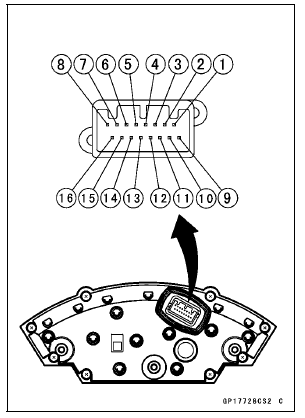
[1] Battery (+) [2] Fuel Reserve Switch [3] Ground (–) [4] Unused [5] Right Turn Signal Indicator Light (LED) (+) [6] Left Turn Signal Indicator Light (LED) (+) [7] High Beam Indicator Light (LED) (+) [8] Neutral Indicator Light (LED) (–) [9] Ignition (+) [10] Warning Indicator Light (Red LED, for Oil Pressure Warning) (–) [11] CAN Communication Line (Low) [12] CAN Communication Line (High) [13] Stop Watch (+) [14] Lap Time (+) [15] Power Mode Button (+) [16] S-KTRC Button (+)
NOTICE
Do not drop the meter unit. Place the meter unit so that it faces upward. If the meter assembly is left upside down or sideways for a long time or dropped, it will malfunction. Do not short each terminals.
 Check 2-3: Intake Air Temperature Inspection
 Check 3-1: CAN Communication Line Resistance Inspection
KIBS Hydraulic Unit Communication Error (Service Code 1b, KIBS Equipped
Models)
KIBS Hydraulic Unit Communication Line Inspection
When the data (for status of KIBS hydraulic unit) is not
sent from the KIBS hydraulic unit to the meter unit and
ECU, the service code 1b is displayed.
The data is sent through the CAN communication line.
The service code 1b is detected with the ...
For Primary Fuel Injectors
Remove the air cleaner housing (see Air Cleaner Housing
Removal).
Disconnect the primary fuel injector connector [A].
Connect a digital meter to the terminals in each primary
fuel injector [A].
Measure the primary fuel injector resistance.
Primary Fuel Injector Resistance ...
What Are The Dealership’s Responsibilities?
Your Kawasaki dealer offers a wide range of services, parts, accessories, and
information on your product and on Kawasaki.
Each dealer is independently owned and operated and is responsible for the
dealership’s
operations, its repair, warranty, and service work, and its personnel.
Your dea ...