
This display mode shows the current mileage by numerical value. The current mileage display is renewed every 4 seconds.
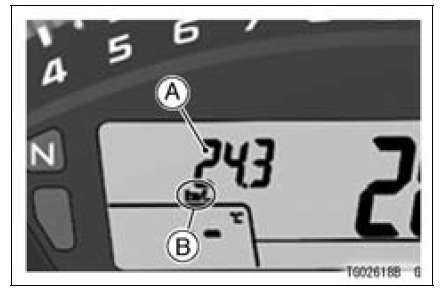
A. Current Mileage
B. “km/L�
NOTE
 Trip Meters
 Average Mileage
Sidestand Installation
Replace the sidestand nut [A] with a new one.
Apply grease to the sliding areas [B].
Tighten the sidestand bolt [C] first, and then the sidestand
nut.
Torque - Sidestand Bolt: 44 N·m (4.5 kgf·m, 32 ft·lb)
Sidestand Nut: 29 N·m (3.0 kgf·m, 21 ft·lb)
Install the spring [D] as sh ...
KIBS System Circuit
1. Ignition Switch
2. Front Wheel Rotation Sensor
3. Front Brake Light Switch
4. Joint Connector C
5. Joint Connector D
6. ECU
7. Rear Wheel Rotation Sensor
8. Rear Brake Light Switch
9. Battery 12 V 8.6 Ah
10. Main Fuse 30 A
11. KIBS Motor Relay Fuse 30 A
12. KIBS Solenoid Valve Rela ...
Electrical Wiring
Wiring Inspection
Visually inspect the wiring for signs of burning, fraying,
etc.
If any wiring is poor, replace the damaged wiring.
Pull each connector [A] apart and inspect it for corrosion,
dirt, and damage.
If the connector is corroded or dirty, clean it carefully. If it
is da ...