
This meter shows the coolant temperature, the intake air temperature or the lap number. The lap number is displayed in the stop watch mode, refer to the “Stop Watch� item in this section.
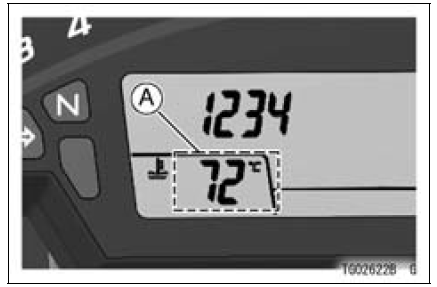
A. Lap Counter/Coolant / Intake Air Temperature Meter
NOTE
 Stop Watch
 Coolant Temperature Meter
Piston Wear Inspection
Measure the outside diameter [A] of each piston 5 mm
(0.20 in.) [B] up from the bottom of the piston at a right
angle to the direction of the piston pin.
If the measurement is under service limit, replace the piston.
Piston Diameter
Standard: 75.959 75.974 mm
(2.9905 2.9911 in.)
...
Battery Maintenance
It is the owner’s responsibility to keep
the battery fully charged. Failure to do
so can lead to battery failure and leave
you stranded.
If you are riding your vehicle infrequently,
inspect the battery voltage
weekly using a voltmeter. If it drops
below 12.8 volts, the battery should be
...
Radiator Fan Relay Inspection
Refer to the Relay Circuit Inspection in the Electrical System
chapter
If the radiator fan relay is normal, check the wiring for
continuity, using the wiring diagram in this section.
Special Tool - Hand Tester: 57001-1394
If the wiring is good, check the ECU for its ground and
power supp ...