
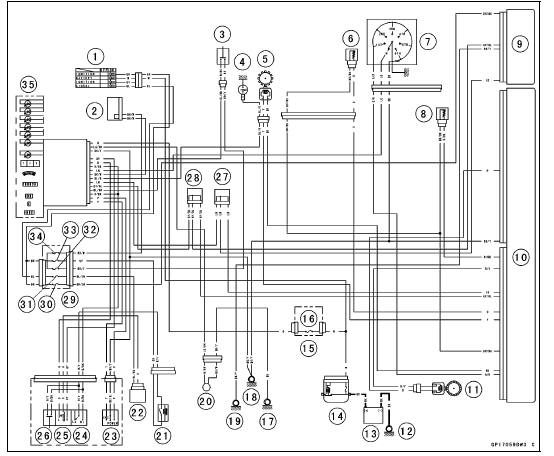
1. Ignition Switch
2. Joint Connector F
3. Stop Watch Button
4. Oil Pressure Switch
5. Crankshaft Sensor
6. Water Temperature Sensor
7. Gear Position Switch
8. Intake Air Temperature Sensor
9. ESD ECU (ZX1000JD/KD)
10. ECU
11. Rear Wheel Rotation Sensor
12. Engine Ground
13. Battery 12 V 6 Ah
14. Main Fuse 30 A
15. Fuse Box 2
16. Meter Fuse 10 A
17. Frame Ground 3
18. Frame Ground 1
19. Frame Ground 4 (ZX1000JD/KD)
20. Fuel Reserve Switch
21. Headlight Relay
22. Turn Signal Relay
23. Mode Switch
24. Dimmer Switch
25. Turn Signal Switch
26. Passing Button
27. Joint Connector D
28. Joint Connector C
29. Fuse Box 1
30. ESD Fuse 10 A (ZX1000JD/KD)
31. Turn Signal Relay Fuse 10 A
32. Brake Light/Horn Fuse 10 A
33. Headlight Relay Fuse 15 A
34. Ignition Fuse 15 A
35. Meter Unit
 Check 3-7 Stop Watch Inspection
 Meter Unit Circuit (ZX1000K Model)
Hoses and Pipes
Hose Installation
Install the hoses and pipes, being careful to follow bending
direction. Avoid sharp bending, kinking, flattening or
twisting.
Run the hoses (see Cable, Wire, and Hose Routing section
in the Appendix chapter).
Install the clamp [A] as near as possible to the hose end
...
Oil Pressure Measurement
Remove:
Right Lower Fairing (see Lower Fairing Removal in the
Frame chapter)
Oil Passage Plug [A]
Attach the adapter [A] and gauge [B] to the plug hole.
Special Tools - Oil Pressure Gauge, 10 kgf/cm²: 57001-164
Oil Pressure Gauge Adapter, PT3/8: 57001
-1233
...
Piston Removal
Remove:
Crankshaft (see Crankshaft Removal)
Remove the piston together with the connecting rod to the
cylinder head side.
NOTICE
Discard the connecting rod bolts and nuts. To prevent
damage to the crankpin surfaces, do not allow
the connecting rod bolts to bump against the
crankpins. ...