
The odometer shows the total distance in kilometers or miles that the vehicle has run. If the odometer is displayed, the “ODO� is displayed on the multifunction display. This meter cannot be reset.
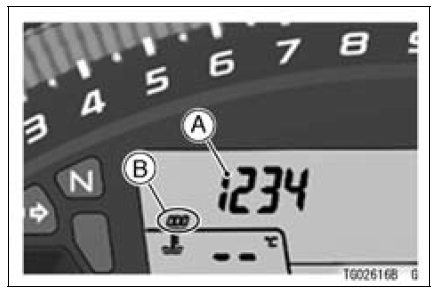
A. Odometer
B. “ODO�
NOTE
 Multifunction Display
 Trip Meters
Subthrottle Sensor Resistance Inspection
Turn the ignition switch to OFF.
Disconnect the subthrottle sensor connector.
Connect a digital meter [A] to the subthrottle sensor connector
[B].
Measure the subthrottle sensor resistance.
Subthrottle Sensor Resistance
Connections: BL lead [D] ←→ BR/BK lead [C]
Standard: ...
Exploded View
AL: Tighten the two clamp bolts alternately two times to ensure even
tightening torque.
HG: Apply high-temperature grease.
R: Replacement Parts
WL: Apply soap and water solution or rubber lubricant.
Specifications
WARNINGSome replacement tires may adversely
affect h ...
Steering Play Inspection
Remove the lower fairings (see Lower Fairing Removal in
the Frame chapter).
Raise the front wheel off the ground with the jack.
Special Tools - Jack: 57001-1238
Jack Attachment: 57001-1608
With the front wheel pointing straight ahead, alternately
tap each end of the handlebar. The f ...