
This indicator shows the selected Power Mode. For more detailed information about the power mode, see power mode section in the How to Ride the Motorcycle chapter.
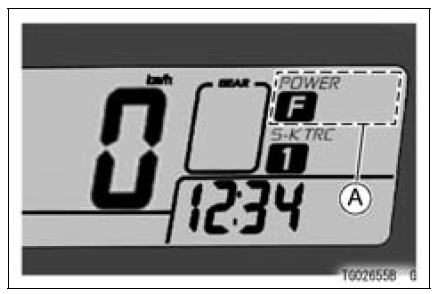
A. Power Mode Indicator
NOTE
When all power mode indicators go off, the battery voltage is insufficient.
Have the machine checked by an authorized Kawasaki dealer promptly because the engine might stop suddenly if it is continued to run with a low battery.
 Economical Riding Indicator
 S-KTRC Mode Indicator
Troubleshooting Guide
NOTE
Refer to the Fuel System chapter for most
of DFI trouble shooting guide.
This is not an exhaustive list, giving every
possible cause for each problem listed. It
is meant simply as a rough guide to assist
the troubleshooting for some of the more
common difficulties.
Engine Doe ...
Cylinder Head Warp Inspection
Clean the cylinder head.
Lay a straightedge across the lower surface of the cylinder
head at several positions.
Use a thickness gauge [A] to measure the space between
the straightedge [B] and the head.
Cylinder Head Warp
Standard: – – –
Service Limit: 0.05 mm (0.0020 in.)
...
Oil Filter Replacement
Drain the engine oil (see Engine Oil Change).
Remove the left lower fairing (see Lower Fairing Removal
in the Frame chapter).
Remove the oil filter [A] with the oil filter wrench [B].
Special Tool - Oil Filter Wrench: 57001-1249
Replace the filter with a new one.
Apply grease t ...