
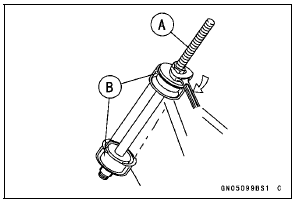
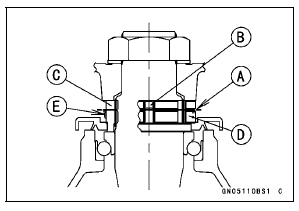
Special Tools - Head Pipe Outer Race Press Shaft [A]: 57001-1075
Head Pipe Outer Race Driver, 
55 [B]: 57001
-1446 or Bearing Driver Set: 57001-1129
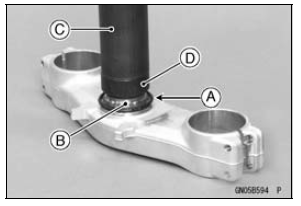
Special Tools - Steering Stem Bearing Driver,
 42.5 [C]:
57001-1344
Steering Stem Bearing Driver Adapter,

41.5 [D]: 57001-1345
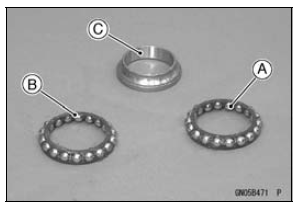
The lower and upper ball bearings are identical.
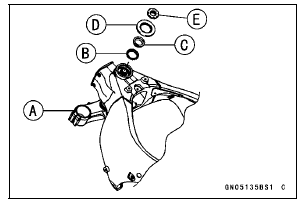
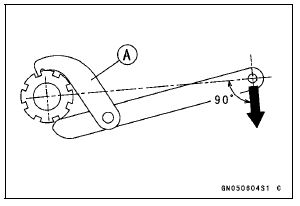
Tighten the steering stem nut with 55 N·m (5.6 kgf·m, 41 ft·lb) of torque first, and loosen it a fraction of a turn until it turns lightly. Afterward tighten it again with specified torque using a steering stem nut wrench [A].
Check that there is no play and the steering stem turns smoothly without rattles. If not, the steering stem bearings may be damaged.
Special Tool - Steering Stem Nut Wrench: 57001-1100
Torque - Steering Stem Nut: 20 N·m (2.0 kgf·m, 15 ft·lb)
NOTE
Torque - Front Fork Clamp Bolts (Upper): 20 N·m (2.0 kgf·m, 15 ft·lb) Steering Stem Head Nut: 78 N·m (8.0 kgf·m, 58 ft·lb) Front Fork Clamp Bolts (Lower): 23 N·m (2.3 kgf·m, 17 ft·lb) Handlebar Clamp Bolts: 25 N·m (2.5 kgf·m, 18 ft·lb)
| WARNING If the handlebar does not turn to the steering stop it may cause an accident resulting in injury or death. Be sure the cables, harnesses and hoses are routed properly and do not interfere with handlebar movement (see Cable, Wire, and Hose Routing section in the Appendix chapter). |
Steering Stem Bearing Lubrication
 Stem, Stem Bearing Removal
 Steering Stem Warp Inspection
Piston Ring Groove Width Inspection
Measure the piston ring groove width.
Use a vernier caliper at several points around the piston.
Piston Ring Groove Width
Standard:
Top [A] 0.82 0.84 mm (0.0323
0.0331 in.)
Second [B] 0.82 0.84 mm
(0.0323 0.0331 in.)
Service Limit:
0.92 mm (0.036 in.)
Second 0.92 mm (0.036 in.)
...
Check 2-1: Speedometer Inspection
Using the suitable stand, raise the rear wheel off the
ground.
Rotate the rear wheel by hand or start the engine.
Check that the display changes speedometer.
If the display function does not work, check the following
parts.
Rear Wheel Rotation Sensor (see Wheel Rotation Sensor
Inspe ...
Fuse Inspection
Remove the fuse.
Inspect the fuse element.
If it is blown out, replace the fuse. Before replacing a
blown fuse, always check the amperage in the affected
circuit. If the amperage is equal to or greater than the
fuse rating, check the wiring and related components for
a short circuit.
...