
NOTICE
Do not remove the bearings for inspection. Removal may damage them.
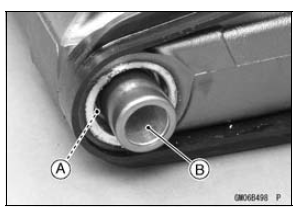
The rollers and ball in a bearing normally wear very little, and wear is difficult to measure. Instead of measuring, visually inspect the bearing for abrasion, discoloration, or other damage.
If the needle bearing, and sleeve [B] show any sings of abnormal wear, discoloration, or damage, replace them as a set.
If bearing play, roughness, or binding is found, replace the bearing.
If the seal is torn or is leaking, replace the bearing.
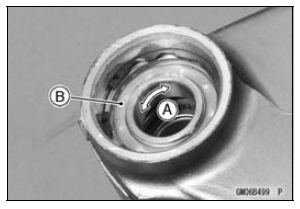
Swingarm Bearing Lubrication
NOTE
Since the bearing are packed with grease and sealed, lubrication is not required.
 Swingarm Bearing Installation
Diode Circuit Inspection
Remove the relay box (see Relay Box Removal).
Check conductivity of the following pairs of terminals (see
Relay Box Internal Circuit in this section).
Diode Circuit Inspection
The resistance should be low in one direction and more
than 10 times as much in the other direction. If any dio ...
Check 3-4: Turn Signal Indicator Light (LED) Inspection
Connect the leads in the same circuit as Check 3-2.
Connect the terminal [5] to the battery (+) terminal.
Connect the terminal [6] to the battery (+) terminal.
Check that the turn signal indicator light (LED) [A] goes
on.
If the indicator light does not go on, replace the meter ...
Turn Signal Relay Inspection
Remove the battery (see Battery Removal).
Take the turn signal relay [A] off the rear fender.
Disconnect the connector [B].
Connect one 12 V battery and turn signal lights as indicated
in the figure, and count how many times the lights
blink for one minute.
Turn Signal Relay ...
