
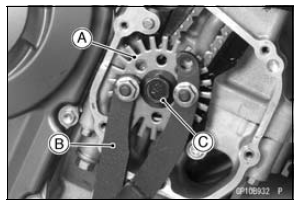
Holding the timing rotor with the flywheel & pulley holder [B] and unscrew the bolt [C].
Special Tool - Flywheel & Pulley Holder: 57001-1605
 Crankshaft Sensor Peak Voltage Inspection
 Timing Rotor Installation
Pressure Testing
Remove:
Upper Fairing Assembly (see Upper Fairing Assembly
Removal in the Frame chapter)
Radiator Cap [A]
Remove the radiator cap in two steps. First turn the cap
counterclockwise to the first stop. Then push and turn it
further in the same direction and remove the cap.
Install the ...
Fuel Hose Replacement
Remove the fuel tank (see Fuel Tank Removal in the Fuel
System (DFI) chapter).
WARNINGFuel is flammable and explosive under
certain conditions
and can cause severe burns. Be prepared
for fuel spillage; any spilled fuel must be completely
wiped up immediately. When the fue ...
Crankshaft Removal
Split the crankcase (see Crankcase Splitting).
Remove:
Connecting Rod Big End Nuts [A]
Connecting Rod Big End Caps [B]
NOTE
Mark and record the locations of the connecting rods
and their big end caps so that they can be reassembled
in their original positions.
Remove the crank ...