
S-KTRC is a highly sophisticated system based on MotoGP racing technology. Unlike the KTRC system used on the GTR1400 ABS (Concours 14 ABS in N. America), which is designed to offer rider reassurance when traversing slippery surfaces, S-KTRC, is designed to maximize forward motion, allowing riding at the edge of traction.
The quickest acceleration requires a certain amount of slip, so in order to optimize traction, S-KTRC actually allows slip. The ideal slip ratio varies according to conditions. The system looks at a number of parameters to get an accurate real-time picture of what is going on: front and rear wheel speed (slippage), engine rpm, throttle position, slippage, acceleration, etc.
Using complex analysis, the system is able to predict when traction conditions are about to become unfavorable. By acting before slippage exceeds the range for optimal traction, drops in power can be minimized resulting in ultra-smooth operation.
There are three available modes that riders can set according to preference (and skill level). Each mode is able to accommodate a range of riding conditions. Of course, engine manageability is such that riders can opt to turn the system OFF without fear of making the bike uncontrollable.
By combining the setting with the power mode, the rider can choose various riding modes to suit the road conditions and riding skill.
The system becomes functional at 5 km/h (3.1 mph) or more. If a failure occurs in the system, the warning indicator light (yellow LED) and mode indicator symbol blink to let the rider know that the system stops functioning.
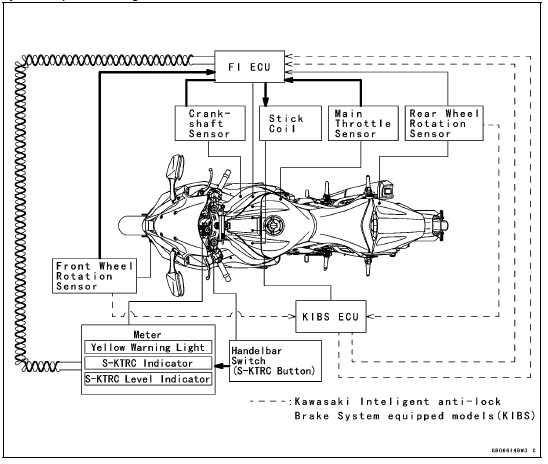
 System Components
Battery Removal
Remove the rider’s seat (see Seats
section in the GENERAL INFORMATION
chapter).
Turn the ignition switch to “OFF� and
disconnect the (–) cable from the battery.
Remove the red cap form the (+) terminal,
and disconnect the (+) cables
from the battery.
NOTE
The battery is ...
Special Tools and Sealants
Outside Circlip Pliers:
57001-144
Piston Pin Puller Assembly:
57001-910
Piston Ring Compressor Grip:
57001-1095
Piston Ring Compressor Belt, 67
79:
57001-1097
Bearing Driver Set:
57001-1129
Liquid Gasket, TB1216B:
92104-1064
Liquid Gasket, TB1207B:
92104-2068
...
Precautions
1) No need of topping-up
No topping-up is necessary in this battery until it ends its life under
normal use. Forcibly prying
off the seal cap to add water is very dangerous. Never do that.
2) Refreshing charge.
Give refresh charge for 5 to 10 hours with charge current shown in the text
(see ...
