
Remove the radiator cap in two steps. First turn the cap counterclockwise to the first stop. Then push and turn it further in the same direction and remove the cap.
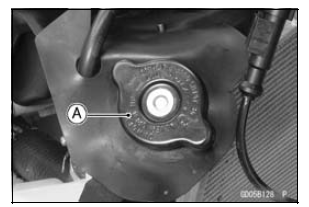
NOTE
Wet the cap sealing surfaces with water or coolant to prevent pressure leaks.
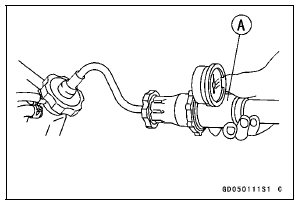
NOTICE
During pressure testing, do not exceed the pressure for which the system is designed. The maximum pressure is 142 kPa (1.45 kgf/cm², 21 psi).
If the pressure holds steady, the system is all right.
If the pressure drops and no external source is found, check for internal leaks. Droplets in the engine oil indicate internal leakage. Check the cylinder head gasket and the water pump.
Remove the pressure tester, replenish the coolant, and install the radiator cap.
 Coolant Deterioration Inspection
 Cooling System Flushing
Alternator Cover Installation
Using a high flash-point solvent, clean off any oil or dirt
that may be on the silicone sealant coating area. Dry
them with a clean cloth.
Apply silicone sealant to the alternator lead grommet and
crankcase halves mating surface [A] on the front and rear
sides of the cover mount.
Sea ...
S-KTRC Mode Indicator
This indicator shows the selected
S-KTRC mode. For more detailed information
about the S-KTRC mode,
see Sport-Kawasaki TRaction Control
(S-KTRC) section in the How to Ride
the Motorcycle chapter
A. S-KTRC Mode Indicator
NOTE
When the all S-KTRC mode indicators
go off, the battery voltag ...
Exploded View
CL: Apply cable lubricant.
EO: Apply engine oil.
G: Apply grease.
HG: Apply high-temperature grease.
L: Apply a non-permanent locking agent.
M: Apply molybdenum disulfide grease.
R: Replacement Parts
S: Follow the specified tightening sequence.
Specifications
Special ...