
If the oil filter holder bolt [A] was removed, tighten it.
Apply a non-permanent locking agent to the threads of the oil filter holder bolt.
Torque - Oil Filter Holder Bolt: 35 N·m (3.6 kgf·m, 26 ft·lb)
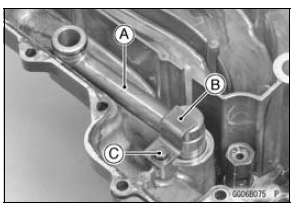
Blow away the particles by applying compressed air [B] from the inside to the outside (from the clean side to the dirty side).
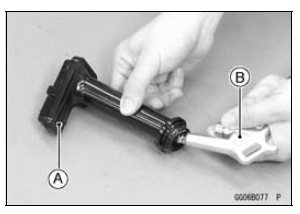
| WARNING Gasoline and low flash-point solvents can be flammable and/or explosive and cause severe burns. Clean the screen in a well-ventilated area, and take care that there are no sparks or flame anywhere near the working area; this includes any appliance with a pilot light. Do not use gasoline or a low flash-point solvent to clean the screen. |
NOTE
While cleaning the oil screen, check for any metal particles that might indicate internal engine damage.
If the screen is damaged, replace it.
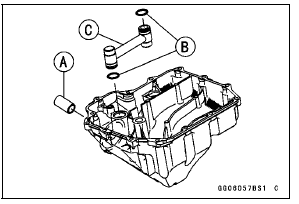
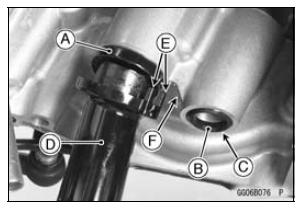
Face the flanged side [B] to the bottom.
Lower Crankcase [C]
Face the knob of the clamp [F] inward as shown in the figure.
Viewed from Bottom [G]
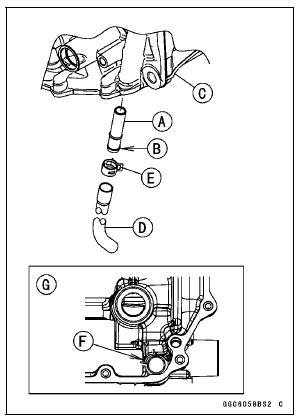
Turn the chamfered side [C] downward.
Fit the claws [E] to the crankcase rib [F].
Torque - Oil Pan Bolts: 9.8 N·m (1.0 kgf·m, 87 in·lb)
Front [D]
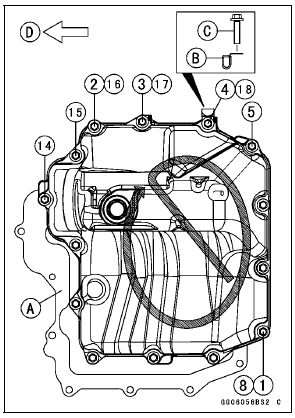
 Oil Pan Removal
Radiator and Radiator Fan Installation
If the radiator bracket [A] was removed, install it.
Install the radiator fan to the radiator
Tighten the radiator fan mounting bolts.
When installing the pad [B], install it so that the upper end
of the pad aligns with the corner top [C].
When install the pad [D], install it so that the ...
Special Tools
Inside Circlip Pliers:
57001-143
Oil Seal & Bearing Remover:
57001-1058
Bearing Driver Set:
57001-1129
Jack:
57001-1238
Bearing Remover Head, 15 ×
17:
57001-1267
Fork Oil Level Gauge:
57001-1290
Bearing Remover Shaft, 13:
57001-1377
Fork Oil Seal Driver, 43:
57001-15 ...
Spark Plugs
The standard spark plug is shown in
the table. The spark plugs should be
replaced in accordance with the Periodic
Maintenance Chart.
Spark plug removal should be done
only by a competent mechanic following
the instructions in the Service Manual.
Spark Plug
A. Plug Gap ...
