
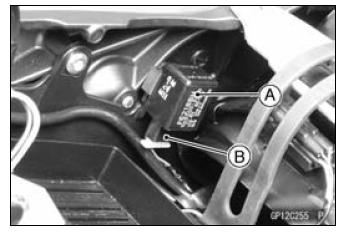
Turn Signal Relay [A] Turn Signal Lights [B] 12 V Battery [C]
If the lights do not blink as specified, replace the turn signal relay.
Testing Turn Signal Relay 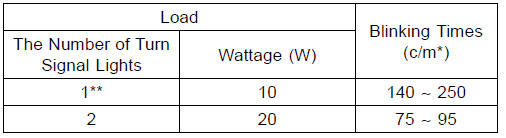
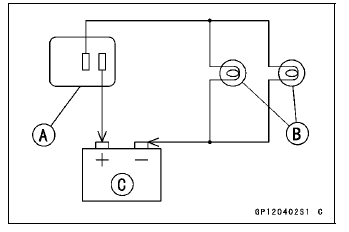
(*): Cycle(s) per minute
(**): Corrected to “one light burned out�.
Turn Signal Light Circuit
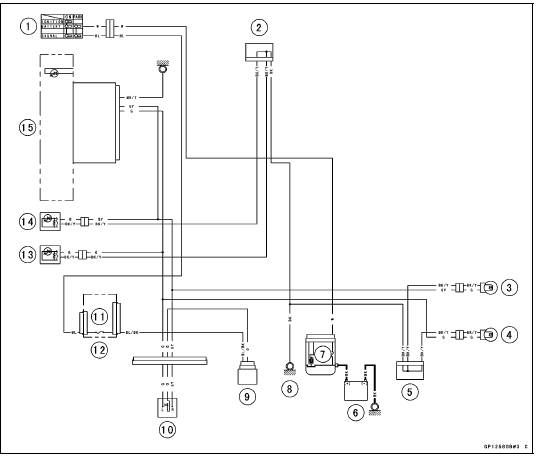
1. Ignition Switch
2. Joint Connector A
3. Rear Right Turn Signal Light 12 V 10 W
4. Rear Left Turn Signal Light 12 V 10 W
5. Joint Connector B
6. Battery
7. Main Fuse 30 A
8. Frame Ground
9. Turn Signal Relay
10. Turn Signal Switch
11. Turn Signal Relay Fuse 10 A
12. Fuse Box 1
13. Front Left Turn Signal Light (LED)
14. Front Right Turn Signal Light (LED)
15. Turn Signal Indicator Light (LED)
 Rear Turn Signal Light Bulb Replacement
 Air Switching Valve
Cylinder Compression Measurement
NOTE
Use the battery which is fully charged.
Warm up the engine thoroughly.
Stop the engine.
Remove the spark plugs (see Spark Plug Replacement in
the Periodic Maintenance chapter).
Attach the compression gauge [A] and adapter [B] firmly
into the spark plug hole.
Using the startermo ...
Radiator Fan Relay Inspection
Refer to the Relay Circuit Inspection in the Electrical System
chapter
If the radiator fan relay is normal, check the wiring for
continuity, using the wiring diagram in this section.
Special Tool - Hand Tester: 57001-1394
If the wiring is good, check the ECU for its ground and
power supp ...
Master Cylinder Rubber Parts Replacement
Front Master Cylinder Disassembly
Remove the front master cylinder (see Front Master Cylinder
Removal in the Brakes chapter).
Remove the seal cover [A], circlip [B], connector [C] and
O-ring [D].
Special Tool - Inside Circlip Pliers: 57001-143
Unscrew the locknut [E] and pivot bolt ...