
In this model, the ABS indicator light (LED) [A] and KIBS indicator light (LED) [B] go on or blink by the data sent from the KIBS hydraulic unit.
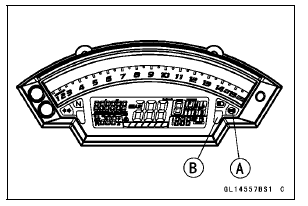
ABS and KIBS Indicator Lights (LED) Function
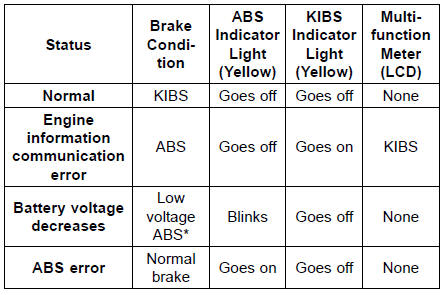
*: The mode of “Low voltage ABS� controls ABS while reducing the load to the battery.
NOTE
When the ABS indicator light is blinking, the ABS has been in the low voltage mode (insufficient battery voltage).
When it is in the low voltage mode, the KIBS system does not function, but the ABS functions. To recover the KIBS system, charge the battery. (see Refreshing Charge in the Electrical System chapter).
 Inquiries to Rider
 KIBS Hydraulic Unit Removal
Hoses and Pipes
Hose Installation
Install the hoses and pipes, being careful to follow bending
direction. Avoid sharp bending, kinking, flattening or
twisting.
Run the hoses (see Cable, Wire, and Hose Routing section
in the Appendix chapter).
Install the clamp [A] as near as possible to the hose end
...
Starter Motor Installation
NOTICE
Do not tap the starter motor shaft or body. Tapping
the shaft or body could damage the motor.
Clean the starter motor legs [A] and crankcase where the
starter motor is ground.
Replace the O-ring [A] with a new one.
Apply grease to the new O-ring.
Tighten:
Torque - Starter ...
ZX1000JB/KB Models
1. Run the fuse box 2 lead in front of the rib for the fuse box 2.
2. Seat Lock Cable
3. Hook the licence plate light lead and the left turn signal light lead on
the projection of the tool
kit case.
4. Rib for Fuse Box 2
5. Run the starter relay lead in back of the rib for the fuse box 2 ...