
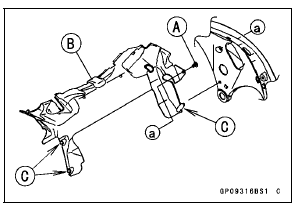
Clear the projections [C] from the main frame.
 Charging System
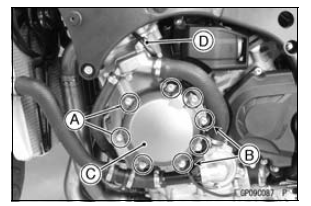
 Alternator Cover Installation
Coolant Flow Chart
1. Radiator
2. Radiator Fan
3. Water Pump
4. Oil Cooler
5. Oil Cooler Intake Hose
6. Oil Cooler Outlet Hose
7. Cylinder Jacket
8. Cylinder Head Jacket
9. Thermostat Housing
10. Air Bleeder Hose
11. Radiator Cap
12. Radiator Overflow Hose
13. Reserve Tank
14. Reserve Tank Overflow Ho ...
Throttle Grip and Cables
Free Play Inspection
Refer to the Throttle Control System Inspection in the Periodic
Maintenance chapter.
Free Play Adjustment
Refer to the Throttle Control System Inspection in the Periodic
Maintenance chapter.
Cable Installation
Install the throttle cables in accordance with the Cable,
...
ECU Removal
NOTICE
Never drop the ECU especially on a hard surface.
Such a shock to the ECU can damage it.
Remove the upper air cleaner housing (see Air Cleaner
Element Replacement in the Periodic Maintenance chapter).
Lift up the ECU [A] with rubber protector [B] to disconnect
the connectors [C]. ...