
The scheduled maintenance must be done in accordance with this chart to keep the motorcycle in good running condition. The initial maintenance is vitally important and must not be neglected.
Periodic Inspection
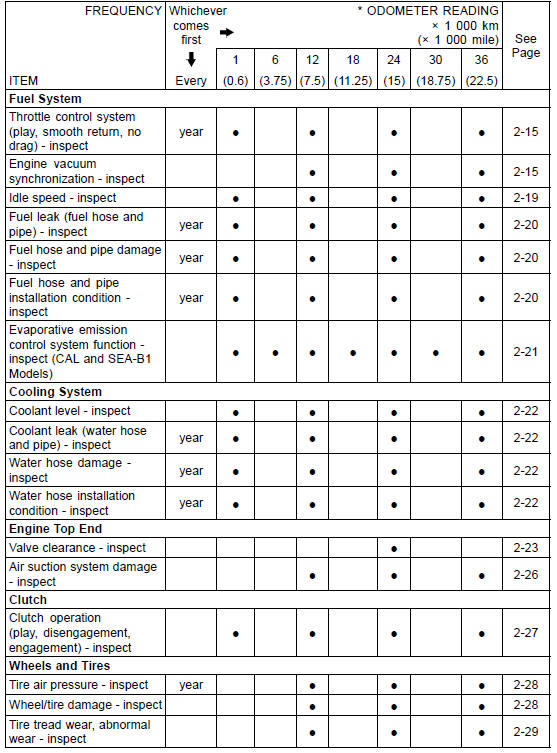
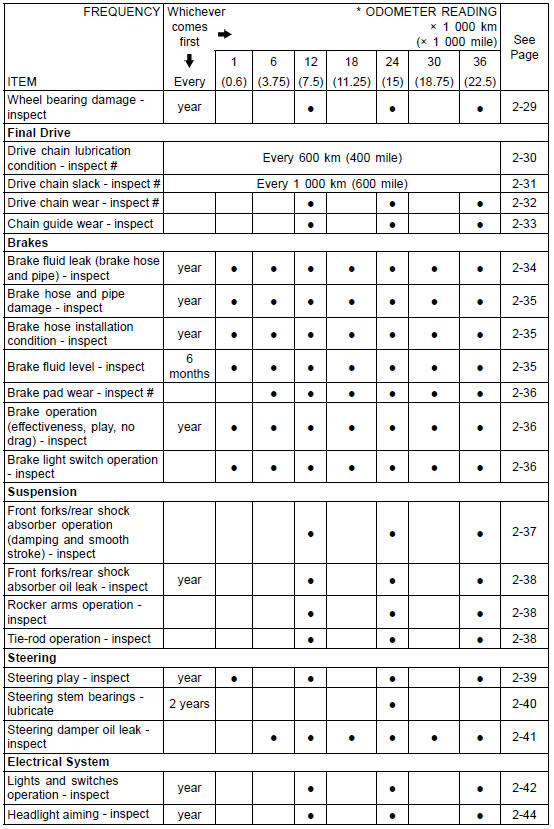
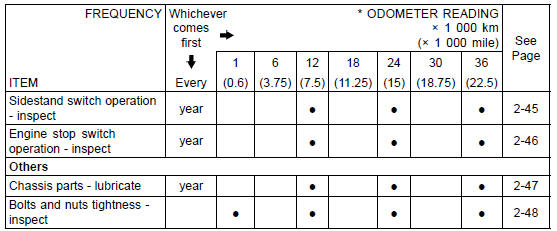
#: Service more frequently when operating in severe conditions; dusty, wet, muddy, high speed or frequent starting/stopping.
*: For higher odometer readings, repeat at the frequency interval established here.
Periodic Replacement Parts
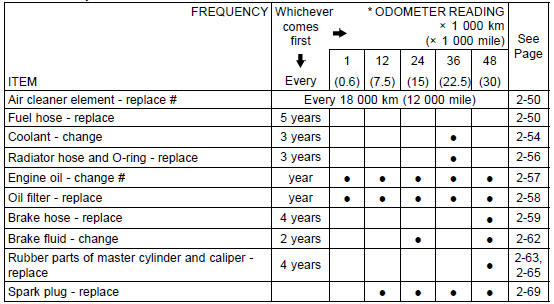
#: Service more frequently when operating in severe conditions; dusty, wet, muddy, high speed or frequent starting/stopping.
*: For higher odometer readings, repeat at the frequency interval established here.
 Torque and Locking Agent
Shift Drum Assembly
Press and insert the ball bearing [A] on the shift drum [B]
until it is bottomed.
Install:
Ball Bearing [C]
Dowel Pin [D] and Shift Drum Cam [E]
Align the pin with the groove in the shift drum cam.
Apply a non-permanent locking agent to the shift drum
cam holder bolt [F].
Tight ...
Front Fork Disassembly
Remove the front fork (see Front Fork Removal (Each
Fork Leg))
Drain the fork oil (see Front Fork Oil Change).
Take the dust seal [A] off the outer tube.
Remove the retaining ring [B].
Separate the outer tube from the inner tube.
Remove the following parts from the inner tube. ...
Coolant Temperature Meter
The coolant temperature gauge indicates
temperature of the engine
coolant. The “ � symbol is displayed
if the coolant temperature meter
is selected.
A. Coolant Temperature Meter
B. Warning Indicator Light (Red)
C. “ � Symbol
If the coolant temperature is below
40°C (104°F ...
