
NOTICE
Never remove the sealing strip, or the battery can be damaged.
Do not install a conventional
battery in this motorcycle, or the
electrical system cannot work
properly.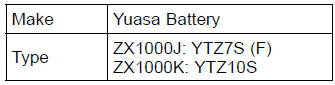
NOTE
If you charge the sealed battery, never fail to observe the instructions shown in the label on the battery.
| WARNING Battery posts, terminals and related accessories contain lead and lead compounds, chemicals known to the State of California to cause cancer and reproductive harm. Wash hands after handling. |
 Battery Maintenance
 Battery Removal
Front Caliper Removal
Remove:
Bolt [A]
Front Wheel Rotation Sensor [B]
Loosen the banjo bolt [C] at the brake hose lower end,
and tighten it loosely.
Unscrew the caliper mounting bolts [D], and detach the
caliper [E] from the disc.
NOTICE
Do not loosen the caliper assembly bolts [F]. Take
out only ...
Crankcase Assembly
NOTICE
The upper and lower crankcase halves are machined
at the factory in the assembled state, so the
crankcase halves must be replaced as a set.
With a high flash-point solvent, clean off the mating surfaces
of the crankcase halves and wipe dry
WARNINGGasoline and low flash-poin ...
Tire Tread Wear Inspection
As the tire tread wears down, the tire becomes more susceptible
to puncture and failure. An accepted estimate is
that 90% of all tire failures occur during the last 10% of tread
life (90% worn). So it is false economy and unsafe to use
the tires until they are bald.
Measure the tread depth a ...