
In accordance with the Periodic Maintenance Chart, it is very important to check the tightness of the bolts and nuts listed here. Also, check to see that each cotter pin is in place and in good condition. Please ask your authorized Kawasaki dealer for torque values.
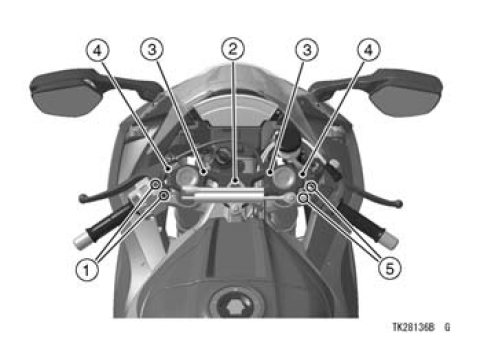
1. Clutch Lever Holder Bolts
2. Steering Stem Head Nut
3. Handlebar Clamp Bolts
4. Front Fork Clamp Bolts
5. Brake Lever Mounting Bolts
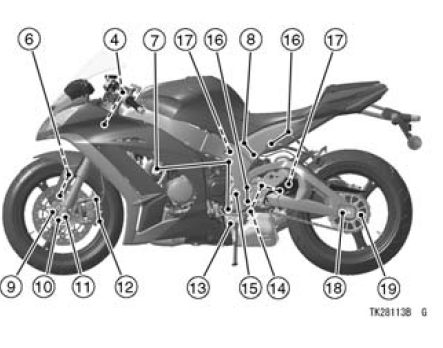
6. Front Fender Mounting Bolts
7. Engine Mounting Bolts and Nuts
8. Rear Frame Mounting Bolts
9. Brake Disc Mounting Bolts
10. Front Axle Clamp Bolts
11. Front Axle Nut
12. Caliper Mounting Bolts
13. Side Stand Bolt
14. Suspension Likage Tie-Rod Nuts
15. Swingarm Pivot Shaft Nut
16. Footpeg Mounting Bolts
17. Rear Shock Absorber Mounting Bolts
18. Rear Axle Nut
19. Rear Sprocket Nuts
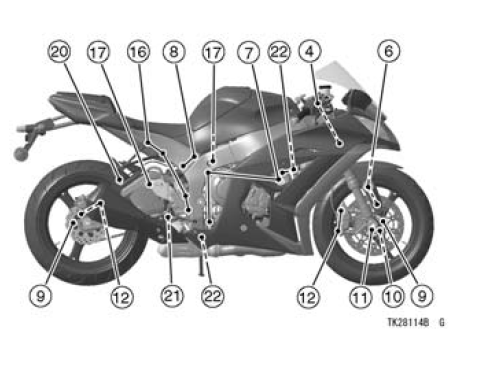
20. Silencer Mounting Bolt
21. Brake Pedal Bolt
22. Exhaust Pipe Mounting Bolt and Nuts
 Leather, Vinyl, and Rubber
 Storage
Lap Counter/Coolant/Intake Air Temperature Meter
This meter shows the coolant temperature,
the intake air temperature or
the lap number. The lap number is displayed
in the stop watch mode, refer to
the “Stop Watch� item in this section.
A. Lap Counter/Coolant / Intake Air
Temperature Meter
The coolant temperature meter and
inta ...
Rear Sprocket Removal
Remove the rear wheel (see Rear Wheel Removal in the
Wheels/Tires chapter).
NOTICE
Do not lay the wheel on the ground with the disc
facing down. This can damage or warp the disc.
Place blocks under the wheel so that the disc does
not touch the ground.
Remove:
Rear Sprocket Nu ...
ESD (Electronic Steering Damper) ECU Communication Error (Service Code 3C,
ZX1000JD/KD)
ESD ECU Communication Line Inspection
When the data (for status of ESD system) is not sent from
the ESD ECU to the meter unit and ECU, the service code
3C is displayed.
The data is sent through the CAN communication line.
The service code 3C is detected with the meter unit.
The FI symbol does ...