
Since the coupling bearing is made to extremely close tolerances, the clearance can not normally be measured.
NOTE
It is not necessary to remove the coupling bearing for inspection. If the bearing is removed, it will need to be replaced with a new one.
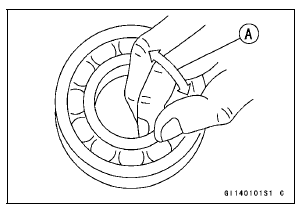
If the bearing play, roughness or binding is found, replace the bearing.
Coupling Bearing Lubrication
Pack the bearing with high-temperature grease. Turn the bearing around by hand a few times to make sure the grease is distributed uniformly inside the bearing.
 Coupling Bearing Installation
 Coupling Damper Inspection
Piston Ring End Gap Inspection
Place the piston ring [A] inside the cylinder (upper
crankcase), using the piston to locate the ring squarely
in place. Set it close to the bottom of the cylinder, where
cylinder wear is low.
Measure the gap [B] between the ends of the ring with a
thickness gauge.
Piston Ring End Gap ...
Fuel Pump Installation
Remove dirt or dust from the fuel pump [A] by lightly applying
compressed air.
Replace the fuel pump gasket with a new one.
Check that the fuel pump terminal [A] and band [B] are in
place.
Apply a non-permanent locking agent to the threads of
the fuel pump bolts.
Tighten the ...
Rear Caliper Holder Shaft Wear
The caliper body must slide smoothly on the caliper holder
shafts [A]. If the body does not slide smoothly, one pad will
wear more than the other, pad wear will increase, and constant
drag on the disc will raise brake and brake fluid temperature.
Check to see that the caliper holder shafts ar ...