
KIBS Hydraulic Unit Communication Line Inspection
When the data (for status of KIBS hydraulic unit) is not sent from the KIBS hydraulic unit to the meter unit and ECU, the service code 1b is displayed.
The data is sent through the CAN communication line.
The service code 1b is detected with the meter unit.
The FI symbol does not appear in this error code.
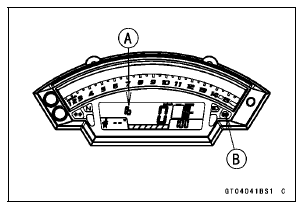
When the service code 1b [A] is detected, the ABS indicator light (LED) [B] goes on and the code of 1b displayed on the LCD.
Special Tool - Hand Tester: 57001-1394
Wiring Inspection KIBS Hydraulic Unit Connector [A] ←→ Meter Unit Connector [B] GY/BL lead (KIBS Hydraulic Unit terminal 2) [C] LB lead (KIBS Hydraulic Unit terminal 11) [D]
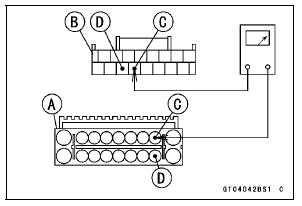
If the wiring is good, replace the KIBS hydraulic unit (see KIBS Hydraulic Unit Removal/Installation in the Brakes chapter).
KIBS Hydraulic Unit Communication Line Circuit
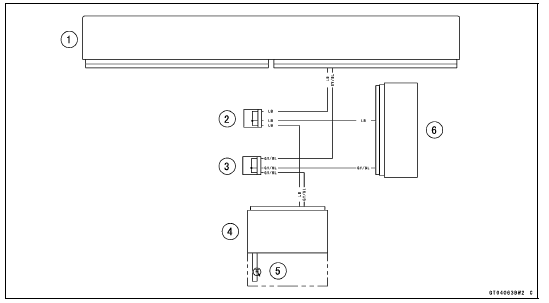
1. ECU
2. Joint Connector D
3. Joint Connector C
4. Meter Unit
5. ABS Indicator Light (LED)
6. KIBS Hydraulic Unit
 Oxygen Sensor Heater Power Source Voltage Inspection
Sprocket Wear Inspection
Visually inspect the engine and rear sprocket teeth for
wear and damage.
If the teeth are worn as illustrated, replace the sprocket,
and inspect the drive chain wear (see Drive Chain Wear
Inspection in the Periodic Maintenance chapter).
Worn Tooth (Engine Sprocket) [A]
Worn Tooth (Rear ...
Valve Seat Inspection
Remove the valve (see Valve Removal).
Check the valve seating surface [A] between the valve [B]
and valve seat [C].
Measure the outside diameter [D] of the seating pattern
on the valve seat.
If the outside diameter is too large or too small, repair the
seat (see Valve Seat Repair).
Val ...
Wheel Rotation Sensor Rotor Inspection
Remove:
Wheels (see Front/Rear Wheel Removal in the
Wheels/Tires chapter)
Brake Disc Mounting Bolts [A]
Sensor Rotor [B]
Front Wheel [C]
Rear Wheel [D]
Visually inspect the wheel rotation sensor rotor.
If the rotor is deformed or damaged (chipped teeth [A]),
replace the ...
