
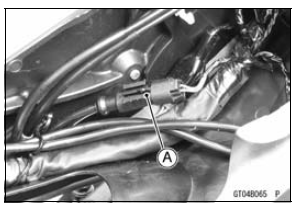
Rear Wheel Rotation Sensor Lead Connector [A] KIBS Hydraulic Unit Lead Connector [B] G Lead Terminals [C] R Lead terminals [D]
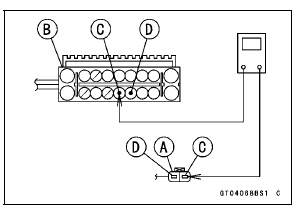
If the wiring is open, replace or repair the harness (see KIBS System Circuit in the Brakes chapter).
If the wiring is good, go to next step.
If this service code appears even if all checks are ended, replace the rear wheel rotation sensor (see Rear Wheel Rotation Sensor Removal in the Brakes chapter).
If the service code does not appear, the KIBS system normal (temporary failure).
 Rear Wheel Rotation Sensor Signal Abnormal (Service Code b 44)
 Power Supply Voltage Inspection (Low-Voltage) (Service Code b 52)
Transmission Shaft Assembly
Apply molybdenum disulfide oil solution to the sliding surfaces
of the gears and shafts.
Install the gears and the gear bushings [A] with their holes
[B] aligned.
Replace any circlips removed with new ones.
Install the circlips [A] so that the opening [B] of it is aligned
with ...
Engine No. ZXT00JE003023
1. Heat Insulation Rubber Plate
2. For Air Switching Valve Hoses (Place the air switching valve above the
rubber plate.)
3. For Stick Coils
4. For Throttle Body Assy Holder #2 and #3
5. For Water Temperature Sensor
6. Insert the tab into the slot.
7. For Throttle Body Assy Holder #4
8. ...
Connecting Rod Big End
Bearing Insert/Crankpin Wear Inspection
Remove the connecting rod big end (see Connecting Rod
Removal).
Cut strips of plastigage to crankpin width. Place a strip
on the crankpin parallel to the crankshaft installed in the
correct position.
Tighten the connecting rod big end nuts to the specified
torque (see Connecting Rod I ...