
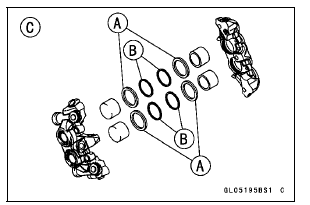
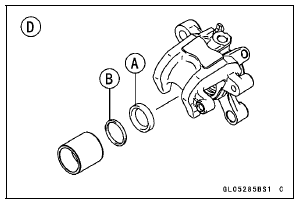
The fluid seal (piston seal) [A] is placed around the piston to maintain clearance between the pad and the disc. If the seal is in a poor condition, it could lead the pad to wear excessively or the brake to drag, which may cause the temperature of the discs or the brake fluid to increase.
Brake fluid leakage around the pad.
Brakes overheat.
Considerable difference in inner and outer pad wear.
Seal and piston are stuck together.
If the fluid seal is replaced, replace the dust seal [B] as well. Also, replace all seals every other time the pads are changed.
Front Caliper [C] Rear Caliper [D]
 Caliper Installation
 Rear Caliper Dust Boot and Friction Boot Damage
Rear Master Cylinder Removal
Unscrew the brake hose banjo bolt [A] and remove the
brake hose (see Brake Hose and Pipe Replacement in
the Periodic Maintenance chapter).
Remove:
Rear Master Cylinder Mounting Bolts [B]
Foot Guard [C]
Screw and Stopper [D]
Bolt [E]
Front Footpeg Bracket Bolts [F]
Cable Guide [G ...
Braking
Close the throttle completely, leaving
the clutch engaged (except when
shifting gears) so that the engine will
help slow down the motorcycle.
Shift down one gear at a time so that
you are in 1st gear when you come
to a complete stop.
When stopping, always apply both
brakes at the ...
Terminal Numbers of ECU Connectors
1. Subthrottle Valve Actuator: Y/BK
2. Subthrottle Valve Actuator: BK/O
3. Unused
4. Front Wheel Rotation Sensor Signal: G/Y
5. Unused
6. Starter Lockout Switch: R/G
7. Gear Position Switch: G/R
8. Crankshaft Sensor (–): BK
9. Power Supply to Sensors: BL
10. Unused
11. Intake Air Pre ...