
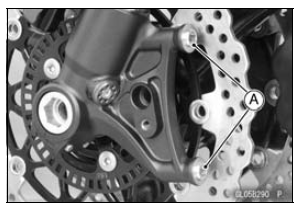
For the front caliper, be sure to install the collars [A].
Replace the washers on each side of hose fitting with new ones.
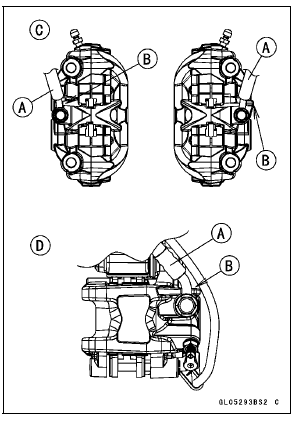
Touch the brake hoses [A] to the stopper [B] of the caliper.
Front Calipers [C] Rear Caliper [D]
| WARNING After servicing, it takes several applications of the brake lever or pedal before the brake pads contact the disc, which could result in increased stopping distance and cause an accident resulting in injury or death. Do not attempt to ride the motorcycle until a firm brake lever or pedal is obtained by pumping the lever or pedal until the pads are against the disc. |
Front Caliper Disassembly
Front Caliper Assembly
Rear Caliper Disassembly
Refer to the Caliper Rubber Parts Replacement in the Periodic Maintenance chapter.
Rear Caliper Assembly
Refer to the Caliper Rubber Parts Replacement in the Periodic Maintenance chapter.
 Rear Caliper Removal
 Caliper Fluid Seal Damage
Immobilizer System (Equipped Models)
This motorcycle is equipped with an immobilizer system to protect the
motorcycle from theft. This
system provides a theft proof device by means of matching a code between the
inbuilt key transponder
and ECU. If the code does notmatch, ignition system, injectors, subthrottle
valve actuator an ...
CAN Communication Line
CAN Communication Line
Resistance Inspection
In this model, resistors for CAN communication line are
built in the ECU [A] and meter unit.
Refer to the Meter Unit Inspection in the Electrical System
chapter for the resistor in the meter unit.
Turn the ignition switch to OFF.
Remove:
EC ...
Multifunction Display
The multifunction display indicates
the following modes.
Odometer
Trip meter A
Trip meter B
Current Mileage
Average Mileage
Fuel Consumption
Stop Watch
These display modes can be shifted
by pushing the upper button.
NOTE
The “FUEL� warning can be indicated
if the ...