
ECU Communication Line Inspection
When the data is not sent from the ECU to the meter unit for more than about 10 seconds, the service code 39 is displayed.
The data is sent through the CAN communication line.
The service code 39 is detected with the meter unit.
When the user mode, this communication error blinks the following items besides the FI warning symbol [A].
Power Mode and S-KTRC Symbols [B] Yellow Color LED [C]
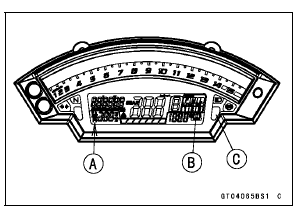
If the CAN communication line resistance is normal, check the wiring according following procedure.
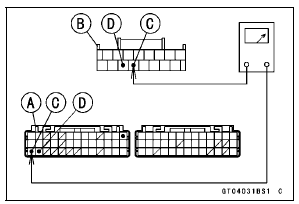
Disconnect the ECU and meter unit connectors.
Special Tool - Hand Tester: 57001-1394
Wiring Inspection ECU Connector [A] ←→ Meter Unit Connector [B] GY/BL lead (ECU terminal 27) [C] LB lead (ECU terminal 28) [D]
ECU Communication Line Circuit
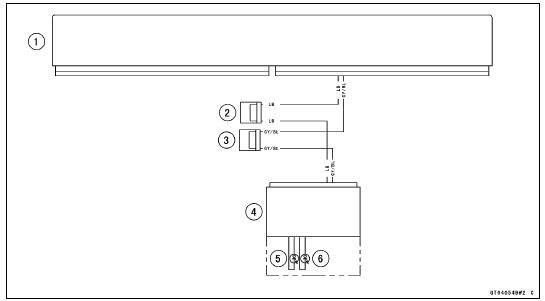
1. ECU
2. Joint Connector D
3. Joint Connector C
4. Meter Unit
5. Warning Indicator Light (LED, Yellow)
6. Warning Indicator Light (LED, Red)
 Blank Key Detection (Service Code 36, Equipped Models)
Crankshaft Sensor Peak Voltage Inspection
Refer to the Crankshaft Sensor Peak Voltage Inspection
in the Electrical System chapter.
If the reading is within the standard, remove the ECU and
check the wiring for continuity between harness connectors.
Special Tool - Hand Tester: 57001-1394
Disconnect the ECU and sensor connector ...
Battery Maintenance
It is the owner’s responsibility to keep
the battery fully charged. Failure to do
so can lead to battery failure and leave
you stranded.
If you are riding your vehicle infrequently,
inspect the battery voltage
weekly using a voltmeter. If it drops
below 12.8 volts, the battery should be
...
Exhaust Device
This motorcycle is equipped with a
exhaust device system. This system
controls the valve in the exhaust pipe
and produces stable engine power at
low and middle engine speed. This exhaust
device is controlled by the ECU,
and adjustment or maintenance should
be done only by a competent mechanic ...
