
 : The fuel level warning
indicators
are activated when approximately 3.8 L
(1.0 US gal) of fuel remains as follows:
For models without KIBS:
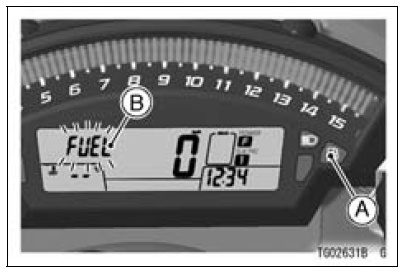
A. Fuel Level Warning Indicator Light
B. “FUEL� Indication
The fuel level warning indicator light
(  ) goes
on and “FUEL� blinks in the
multifunction display.
For models equipped with KIBS:
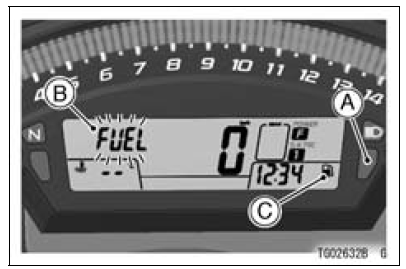
A. Warning Indicator Light (Yellow)
B. “FUEL� Indication
C. Warning Symbol (
 )
)
The yellow warning indicator light and
warning symbol ( 
) goes on, and
“FUEL� blinks in the multifunction display.
Refuel at the earliest opportunity when the fuel level warning indicator light goes on and “FUEL� blinks.
When vehicle stands with side stand, the fuel level warning indicator light cannot show the amount of fuel in the fuel tank exactly. Stand upright the vehicle to check the fuel level.
NOTE
When pushing the upper button while “FUEL� is displayed, the multifunction display can be shifted to odometer mode.
 ABS Indicator Light (For models equipped with KIBS)
 Warning Indicator Light (Red)
Alternator Rotor Removal
Remove the alternator cover (see Alternator Cover Removal).
Clean off the oil from the outer circumference of the rotor.
Hold the alternator rotor steady with the rotor holder [A]
and suitable washer or plate [B].
Special Tools - Grip [C]: 57001-1591
Rotor Holder: 57001-1666
Flywheel P ...
Axle Inspection
Remove the front and rear axles (see Front/Rear Wheel
Removal).
Visually inspect the front and rear axle for damages.
If the axle is damaged or bent, replace it.
Place the axle in V blocks that are 100 mm (3.94 in.) [A]
apart, and set a dial gauge [B] on the axle at a point
halfway ...
Fuel Injector Output Voltage Inspection
NOTE
Be sure the battery is fully charged.
Turn the ignition switch to OFF.
Remove the ECU (see ECU Removal).
Do not disconnect the ECU connector
Connect a digital meter [A] to the connector (gray) [B] with
the needle adapter set.
Special Tool - Needle Adapter Set: 57001-1457
...