
Special Tool - Hand Tester: 57001-1394
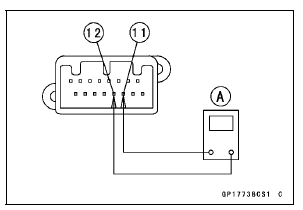
CAN Communication Line Resistance (at Meter Unit)
Standard: 122  126 Ω
126 Ω
If the tester reading is not specified, replace the meter unit.
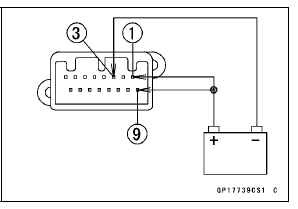
Check 3-2: Meter Unit Power Supply Check
Connect the battery positive (+) terminal to the terminal [1] [9].
Connect the battery negative (–) terminal to the terminal [3].
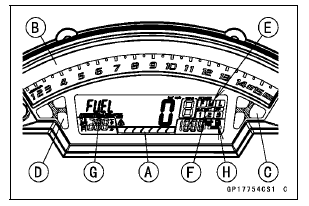
The all LCD segments [A] appear for 3 seconds.
The tachometer (LED) [B] blinks 3 times.
For ZX1000J model, the fuel level warning indicator light (LED) [C] and warning indicator light (Red LED) [D] go on.
For ZX1000K model, the ABS indicator light (LED) [C] and warning indicator light (Red LED) [D] go on.
The following items blinks.
Power Mode Indicator [E] S-KTRC Mode indicator [F] “FUEL� Segment [G] Fuel Level Warning Symbol [H] (ZX1000K model)
 Meter Unit Inspection
 Check 3-3: High Beam Indicator Light (LED) Inspection
Stem, Stem Bearing Installation
Replace the bearing outer races with new ones.
Drive them into the head pipe at the same time.
Special Tools - Head Pipe Outer Race Press Shaft [A]:
57001-1075
Head Pipe Outer Race Driver,
55 [B]: 57001
-1446 or Bearing Driver Set: 57001-1129
Apply grease to the outer races.
...
Sidestand Removal
Raise the rear wheel off the ground with the stand [A].
Remove:
Sidestand Switch Bolt [A]
Sidestand Switch [B]
Remove:
Spring [A]
Sidestand Nut [B]
Sidestand Bolt [C]
Sidestand [D]
...
Spring Preload Adjustment
The spring preload adjuster is located
at the lower end of each front fork leg
and can be adjusted.
To increase spring preload and
stiffen the suspension, turn the
preload adjuster clockwise with a
hexagon wrench.
To decrease preload and soften the
suspension, turn the preload adjust ...