
[1] Battery (+) [2] Fuel Reserve Switch [3] Ground (–) [4] Unused [5] Right Turn Signal Indicator Light (LED) (+) [6] Left Turn Signal Indicator Light (LED) (+) [7] High Beam Indicator Light (LED) (+) [8] Neutral Indicator Light (LED) (–) [9] Ignition (+) [10] Warning Indicator Light (Red LED, for Oil Pressure Warning) (–) [11] CAN Communication Line (Low) [12] CAN Communication Line (High) [13] Stop Watch (+) [14] Lap Time (+) [15] Power Mode Button (+) [16] S-KTRC Button (+)
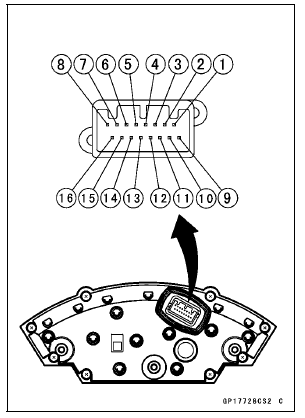
NOTICE
Do not drop the meter unit. Place the meter unit so that it faces upward. If the meter assembly is left upside down or sideways for a long time or dropped, it will malfunction. Do not short each terminals.
 Check 2-3: Intake Air Temperature Inspection
 Check 3-1: CAN Communication Line Resistance Inspection
ESD (Electronic Steering Damper) ECU Error (Service Code E3b, ZX1000JD/KD)
If this service code appears, check that the following parts
are correctly.
Crankshaft Sensor
Gear Position Switch
Starter Lockout Switch
Main Throttle Sensor
Rear Wheel Rotation Sensor
If these parts are normal, check the ESD ECU for its
ground and power supply (see ESD ECU Power Supply
...
Air Cleaner Housing Installation
For ZX1000JD/KD, be sure to install the pad [A].
Install the clamp bolt heads [A] inside as shown in the
figure.
Install the air cleaner housing on the throttle body assy.
Push in the ducts [B] touch the stoppers [C] of the throttle
body.
Be sure the hoses are routed correctly ...
Lighting System
This motorcycle adopt the daylight system and have a
headlight relay in the relay box. The headlight does not
go on when the ignition switch and the engine stop switch
are first turned on. The headlight comes on after the starter
button is released and stays on until the ignition switch is
turn ...