
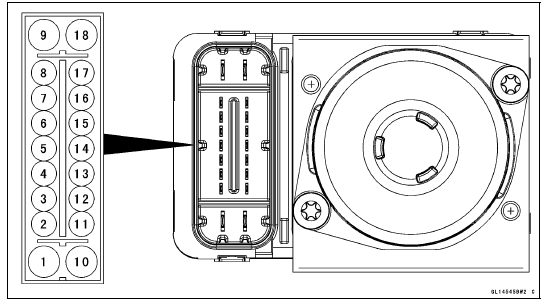
1. Ground: BK
2. CAN Communication Line (High): GY/BL
3. Front Wheel Rotation Sensor Signal Input: Y
4. Power Supply: BR/W
5. KIBS Kawasaki Self-Daignosis System Terminal: P
6. Front and Rear Brake Light Switch Signal: BL/R
7. Unused
8. Front Wheel Rotation Sensor Signal Output: G/Y
9. Power Supply to ABS Solenoid Valve Relay: R/BK
10. Ground to Motor: BK
11. CAN Communication Line (Low): LB
12. Power Supply to Front Wheel Rotation Sensor: W
13. Power Supply to Rear Wheel Rotation Sensor: R
14. Rear Wheel Rotation Sensor Signal Input: G
15. Unused
16. Rear Wheel Rotation Sensor Signal Output: R/Y
17. Unused
18. Power Supply to ABS Motor Relay: R/W
 KIBS System Circuit
 KIBS Servicing Precautions
Camshaft Runout Inspection
Remove the camshafts (see Camshaft Removal).
Set the camshaft in a camshaft alignment jig or on V
blocks.
Measure the runout with a dial gauge at the specified
place as shown in the figure.
If the runout exceeds the service limit, replace the
camshaft.
Camshaft Runout
Standard: TIR ...
Check 2-1: Speedometer Inspection
Using the suitable stand, raise the rear wheel off the
ground.
Rotate the rear wheel by hand or start the engine.
Check that the display changes speedometer.
If the display function does not work, check the following
parts.
Rear Wheel Rotation Sensor (see Wheel Rotation Sensor
Inspe ...
Timing Rotor Installation
Install the timing rotor [A] on the crankshaft [B] with their
teeth [C] aligned.
Holding the timing rotor with the flywheel & pulley holder
and tighten the bolt.
Torque - Timing Rotor Bolt: 39 N·m (4.0 kgf·m, 29 ft·lb)
Special Tool - Flywheel & Pulley Holder: 57001-1605
I ...