
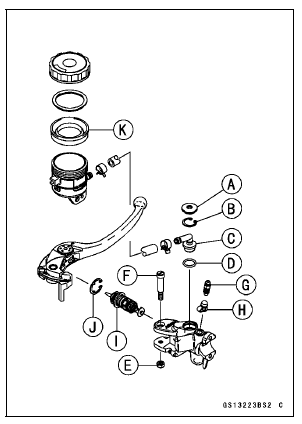
Front Master Cylinder Disassembly
Special Tool - Inside Circlip Pliers: 57001-143
Remove the dust cover and push rod.
Remove the circlip [J]
Pull out the piston (with primary cup and secondary cup).
Remove the return spring and spring guide.
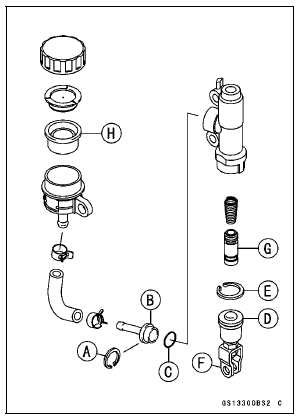
Rear Master Cylinder Disassembly
Special Tool - Inside Circlip Pliers: 57001-143
Master Cylinder Assembly
NOTICE
Except for the disc pads and disc, use only disc brake fluid, isopropyl alcohol, or ethyl alcohol for cleaning brake parts. Do not use any other fluid for cleaning these parts. Gasoline, engine oil, or any other petroleum distillate will cause deterioration of the rubber parts. Oil spilled on any part will be difficult to wash off completely, and will eventually deteriorate the rubber used in the disc brake.
Front: Brake Lever Pivot Bolt
Rear: Dust Cover of Push Rod Assembly
Torque - Brake Lever Pivot Bolt: 1.2 N·m (0.12 kgf·m, 11 in·lb) Brake Lever Pivot Bolt Locknut: 5.9 N·m (0.60 kgf·m, 52 in·lb)
Torque - Front Master Cylinder Bleed Valve: 5.4 N·m (0.55 kgf·m, 48 in·lb)
 Brake Fluid Change
 Caliper Rubber Parts Replacement
Valve Guide Removal
Remove:
Valve (see Valve Removal)
Oil Seal
Spring Seat
Heat the area around the valve guide to 120
150°C (248
302°F), and hammer lightly on
the valve guide arbor [A]
to remove the guide from the top of the head.
NOTICE
Do not heat the cylinder head with a torch. This ...
Thermostat Installation
Replace the O-rings [A] with new ones, and apply grease
to them.
Assemble:
O-rings
Thermostat Housing [B]
Thermostat [C]
Thermostat Cap [D]
Install the thermostat [A] in the housing so that the air
bleeder hole [B] is on top.
Tighten:
Torque - Thermostat Cap Bolts: 5.9 N ...
Turn Signal Switch
When the turn signal switch is
pushed to the left ( ) or right
( ), the corresponding turn signals
blink on and off.
To stop blinking, push the switch in.
Horn Button
When the horn button is pushed, the
horn sounds
LAP/Passing Button
When the LAP/passing button is
pushed, the headlight hi ...