
The Power mode determines the engine power output characteristics and has three settings.
The S-KTRC and the Power mode can be set separately. By combining each setting, the rider can get various power feelings to suit riding conditions or individual preference.
Mode F (Full Power):
The highest engine power output is achieved. The rider can feel the full throttle response of the engine.
Mode M (Middle Power):
The throttle response is less sharp compared to the mode F.
Depending throttle application full power can be accessed temporarily.
Mode L (Low Power):
About 60% of the highest engine power output is achieved. The throttle response is mildest among the three modes.
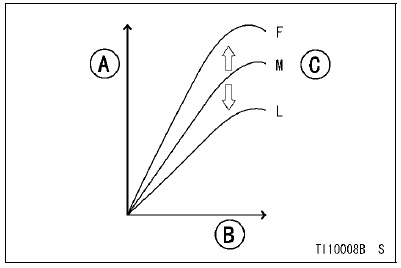
A. Power
B. Engine rpm
C. Depending on Throttle Angle
Power mode Button
For the power mode setting, use the power mode button on the left handlebar switch.
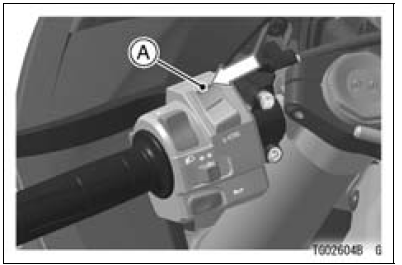
A. Power mode Button (Upper Part)
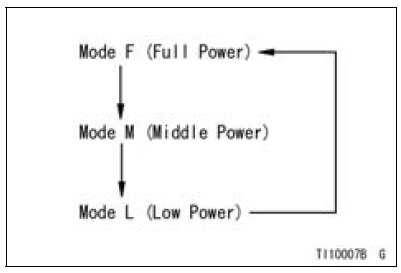
Power mode setting
Themode can be changed only when the throttle grip is closed completely.
NOTE
When changing the mode, stop the motorcycle.
 0.4
0.4
NOTE
 Sport-kawasaki traction control (s-ktrc)
 Safe operation
For Primary Fuel Injectors
Remove the air cleaner housing (see Air Cleaner Housing
Removal).
Disconnect the injector connector and connect the harness
adapter [A] between these connectors as shown in
the figure.
Main Harness [B]
Primary Fuel Injector #1 [C]
Special Tool - Measuring Adapter: 57001-1700
...
Check 3-6: Neutral Indicator Light (LED) Inspection
Connect the leads in the same circuit as Check 3-2.
Connect the terminal [8] to the battery (–) terminal.
Check that the neutral indicator light (LED) [A] goes on.
If the indicator light does not go on, replace the meter unit.
...
Fuel Hose Inspection (fuel leak, damage, installation condition)
If the motorcycle is not properly handled, the high pressure
inside the fuel line can cause fuel to leak [A] or the
hose to burst. Remove the fuel tank (see Fuel Tank Removal
in the Fuel System (DFI) chapter) and check the
fuel hoses.
Replace the fuel hose if any fraying, cracks [B] or ...