
This indicator shows the selected S-KTRC mode. For more detailed information about the S-KTRC mode, see Sport-Kawasaki TRaction Control (S-KTRC) section in the How to Ride the Motorcycle chapter
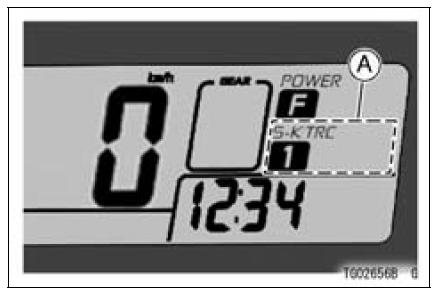
A. S-KTRC Mode Indicator
NOTE
When the all S-KTRC mode indicators go off, the battery voltage is insufficient. Have the machine checked by an authorized Kawasaki dealer promptly because the engine might stop suddenly when keeping running in that condition.
 Power Mode Indicator
 Warning/Indicator Lights
Fuel Injector Output Voltage Inspection
NOTE
Be sure the battery is fully charged.
Turn the ignition switch to OFF.
Remove the ECU (see ECU Removal).
Do not disconnect the ECU connector
Connect a digital meter [A] to the connector (gray) [B] with
the needle adapter set.
Special Tool - Needle Adapter Set: 57001-1457
...
Terminal Numbers of ECU Connectors
1. Subthrottle Valve Actuator: Y/BK
2. Subthrottle Valve Actuator: BK/O
3. Unused
4. Front Wheel Rotation Sensor Signal: G/Y
5. Unused
6. Starter Lockout Switch: R/G
7. Gear Position Switch: G/R
8. Crankshaft Sensor (–): BK
9. Power Supply to Sensors: BL
10. Unused
11. Intake Air Pre ...
Oil Level Inspection
Check that the engine oil level is between the upper [A]
and lower [B] levels in the gauge.
NOTE
Situate the motorcycle so that it is perpendicular to the
ground.
If the motorcycle has just been used, wait several minutes
for all the oil to drain down.
If the oil has just been changed, ...