
Kawasaki Ninja Owners Manual: Meter instruments

Kawasaki Ninja Owners Manual / General information / Meter instruments

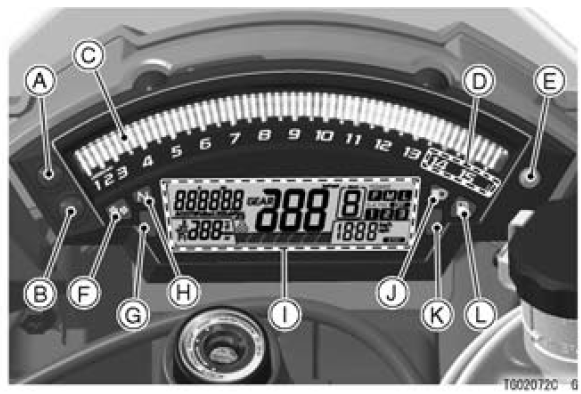
Meter instruments


  1. Upper Button
  2. Lower Button
  3. Tachometer (with Shift-Up Indicator)
  4. Red Zone
  5. Ambient Brightness Sensor
  6. Turn Signal Indicator Light
  7. Warning Indicator Light (Red)
  8. Neutral Indicator Light
  9. Multifunction Meter
  10. High Beam Indicator Light
  11. Warning Indicator Light (Yellow)
  12. Fuel Level Warning Indicator Light

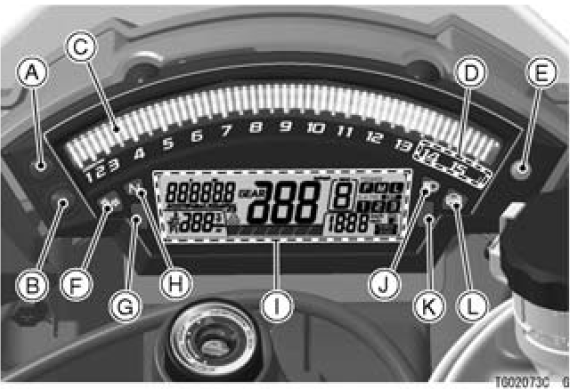
For models equipped with KIBS*
For models equipped with KIBS*


  1. Upper Button
  2. Lower Button
  3. Tachometer (with Shift-Up Indicator)
  4. Red Zone
  5. Ambient Brightness Sensor
  6. Turn Signal Indicator Light
  7. Warning Indicator Light (Red)
  8. Neutral Indicator Light
  9. Multifunction Meter
  10. High Beam Indicator Light
  11. Warning Indicator Light (Yellow)
  12. ABS Indicator Light

KIBS*: Kawasaki Intelligent anti-lock Brake System

General information
...

Tachometer
The tachometer shows the engine speed in revolutions per minute (r/min, rpm). On the right side of the tachometer face is a portion called the “red zone”. Engine r/min (rpm) in the red zo ...

Other materials:

What if I am not Satisfied With My Warranty Service?
If you aren’t satisfied with your dealership’s repair work or operations, it is best to discuss the situation with the appropriate dealership manager. If you have already done this, then contact the dealership’s owner or general manager to request a review of the issue. If you are un ...

Front Seat Installation
Installation is the reverse of removal. Note the following. Check that the dampers [A] are in place on the front seat. Install the collars [B] as shown in the figure. Place the seat hooks [A] under the fuel tank bracket [B]. ...

Stop Watch
The stop watch can be used in closed course competition. The stop watch is operated as follows: Push the upper button to display the stop watch. To start the stop watch, push the “START/STOP” switch on the right handlebar switch to the left. A. “START/STOP” Switch ...