Kawasaki Ninja Service Manual: Service Code Reading
The service code(s) is displayed on the LCD by the number
of two digits.
NOTE
- The service code of the KIBS and ABS adds “b� at the
left side of the code.
- The service code of the ESD adds “E� at the left side of
the code.
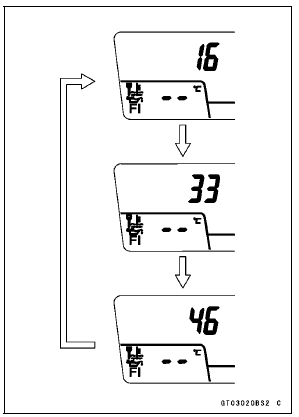
- When there are a number of problems, all the service
codes can be stored and the display will begin starting
from the lowest number service code in the numerical order.
- Then after completing all codes, the display is repeated
until the ignition switch is turned to OFF or upper button
and lower button are pushed for more than two seconds.
- The order of the system’s appearing is the order of
DFI System, Immobilizer System (equipped models),
S-KTRC System, KIBS and ABS (equipped models), and
ESD System (ZX1000JD/KD).
- For example, if three problems occurred in the order of
46, 16, 33, the service codes are displayed (each two
seconds) from the lowest number in the order listed as
shown below.
(16 → 33 → 46) → (16 → 33 → 46) → → ····· (repeated)
- If the no problem or when the repair has been done, warning
indicator light (LED) and warning symbol go off and
service code is not displayed.
NOTE
Use a fully charged battery when conducting
self-diagnosis. Otherwise, the light (LED) and symbol
do not light or blink.
Turn the ignition switch to ON.
When a problem occurs with D ...
When repair has been done, warning indicator light (LED) and warning symbol
go off and service
code are not displayed.
But the service codes stored in memory of the ECU are not erased to preserve ...
Other materials:
Power mode
The Power mode determines the engine
power output characteristics and
has three settings.
The S-KTRC and the Power mode
can be set separately. By combining
each setting, the rider can get various
power feelings to suit riding conditions
or individual preference.
Mode F (Full Power):
The h ...
Timing Rotor Installation
Install the timing rotor [A] on the crankshaft [B] with their
teeth [C] aligned.
Holding the timing rotor with the flywheel & pulley holder
and tighten the bolt.
Torque - Timing Rotor Bolt: 39 N·m (4.0 kgf·m, 29 ft·lb)
Special Tool - Flywheel & Pulley Holder: 57001-1605
I ...
Fuel Pump Relay Inspection
Refer to the Relay Circuit Inspection in the Electrical System
chapter.
If the fuel pump relay is normal, check the wiring to the
fuel pump relay (see Fuel Pump Relay Circuit).
Special Tool - Hand Tester: 57001-1394
If the wiring is good, check the ECU for its ground and
power supply (se ...

 Self-Diagnosis Procedures
 Service Code Erasing