
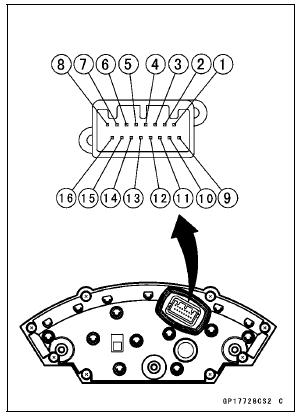
[1] Battery (+) [2] Fuel Reserve Switch [3] Ground (–) [4] Unused [5] Right Turn Signal Indicator Light (LED) (+) [6] Left Turn Signal Indicator Light (LED) (+) [7] High Beam Indicator Light (LED) (+) [8] Neutral Indicator Light (LED) (–) [9] Ignition (+) [10] Warning Indicator Light (Red LED, for Oil Pressure Warning) (–) [11] CAN Communication Line (Low) [12] CAN Communication Line (High) [13] Stop Watch (+) [14] Lap Time (+) [15] Power Mode Button (+) [16] S-KTRC Button (+)
NOTICE
Do not drop the meter unit. Place the meter unit so that it faces upward. If the meter assembly is left upside down or sideways for a long time or dropped, it will malfunction. Do not short each terminals.
 Check 2-3: Intake Air Temperature Inspection
 Check 3-1: CAN Communication Line Resistance Inspection
Drive Chain Removal/Installation
NOTE
Since the drive chain is installed through the swingarm,
The chain can not be removed other than by cutting it.
Prepare the new link pin, link plate, grease seals, and
tools for rejoining the chain.
Remove:
Bolts [A]
Front Footpeg Bracket [B]
Remove:
Bolts [A]
Chain Cover [B]
...
Piston Installation
Apply molybdenum disulfide oil solution to the oil ring expander,
and install the oil ring expander [A] in the bottom
piston ring groove so the ends [B] not butt together
Applymolybdenum disulfide oil solution to the oil ring steel
rails, and install the oil ring steel rails, one above th ...
Oil Pump Drive Gear Shaft Installation
Apply molybdenum disulfide grease [A] to the oil pump
drive gear shaft.
Apply molybdenum disulfide oil solution to the followings.
Transmission Case [B]
Crankcase [C]
Install the oil pump drive gear shaft and washer [D] as
shown in the figure.
Install the new circlip [E] into the ...