
Insert a thickness gauge [A] between the big end and either crank web to determine clearance.
Connecting Rod Big End Side Clearance
Standard: 0.13  0.38 mm
(0.0051  0.0150 in.)
Service Limit: 0.58 mm (0.023 in.)
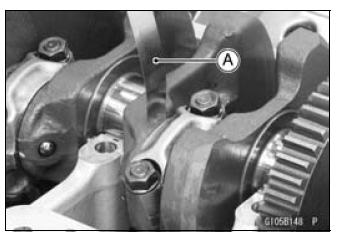
If the clearance exceeds the service limit, replace the connecting rod with new one and then check clearance again.
If the clearance is too large after connecting rod replacement, the crankshaft also must be replaced.
 Connecting Rod Twist Inspection
 Connecting Rod Big End
Bearing Insert/Crankpin Wear Inspection
Connecting Rod Big End
Bearing Insert/Crankpin Wear InspectionAxle Inspection
Remove the front and rear axles (see Front/Rear Wheel
Removal).
Visually inspect the front and rear axle for damages.
If the axle is damaged or bent, replace it.
Place the axle in V blocks that are 100 mm (3.94 in.) [A]
apart, and set a dial gauge [B] on the axle at a point
halfway ...
Fuel Level Warning Indicator Light
: The fuel level warning
indicators
are activated when approximately 3.8 L
(1.0 US gal) of fuel remains as follows:
For models without KIBS:
A. Fuel Level Warning Indicator Light
B. “FUEL� Indication
The fuel level warning indicator light
( ) goes
on and “FUEL� blinks in the
...
Check 3-5: Warning Indicator Light (Red LED) (Oil Pressure Warning)
Inspection
Connect the leads in the same circuit as Check 3-2.
Connect the terminal [10] to the battery (–) terminal.
Check that the oil pressure warning symbol [A] and the
warning indicator light (Red LED) [B] go on.
If the indicator light does not go on, replace the meter unit.
...