
NOTE
If the crankshaft is replaced with a new one, refer to the Connecting Rod Big End Bearing/Crankshaft Main Bearing Insert Selection in the Specifications.
NOTICE
If the crankshaft, bearing inserts, or crankcase halves are replaced with new ones, select the bearing inserts and check clearance with a plastigage (press gauge) before assembling engine to be sure the correct bearing inserts are installed.
Turn the oil groove side of the thrust washer to the crankshaft.
NOTE
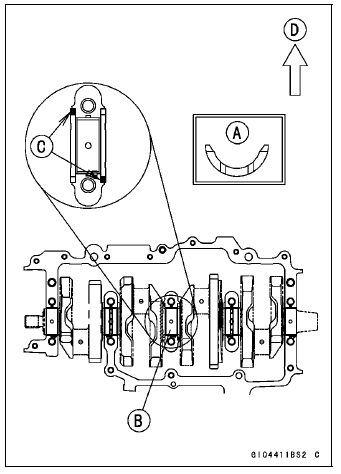
Front [D]
Connecting Rod Removal
 Crankshaft Removal
 Connecting Rod Installation
Drive Chain Slack Inspection
Refer to the Drive Chain Slack Inspection in the Periodic
Maintenance chapter.
Drive Chain Slack Adjustment
Refer to the Drive Chain Slack Adjustment in the Periodic
Maintenance chapter.
Wheel Alignment Inspection/Adjustment
Refer to the Wheel Alignment Inspection in the Periodic
Maintenance ...
Valve Guide Removal
Remove:
Valve (see Valve Removal)
Oil Seal
Spring Seat
Heat the area around the valve guide to 120
150°C (248
302°F), and hammer lightly on
the valve guide arbor [A]
to remove the guide from the top of the head.
NOTICE
Do not heat the cylinder head with a torch. This ...
Oxygen Sensor Removal (Equipped Models)
Remove:
Fuel Tank (see Fuel Tank Removal in the Fuel System
(DFI) chapter)
Right Lower Fairing (see Lower Fairing Removal in the
Frame chapter)
Disconnect the oxygen sensor lead connector [A].
NOTICE
Do not pull strongly, twist, or bend the oxygen sensor
lead. This may cause the wi ...