
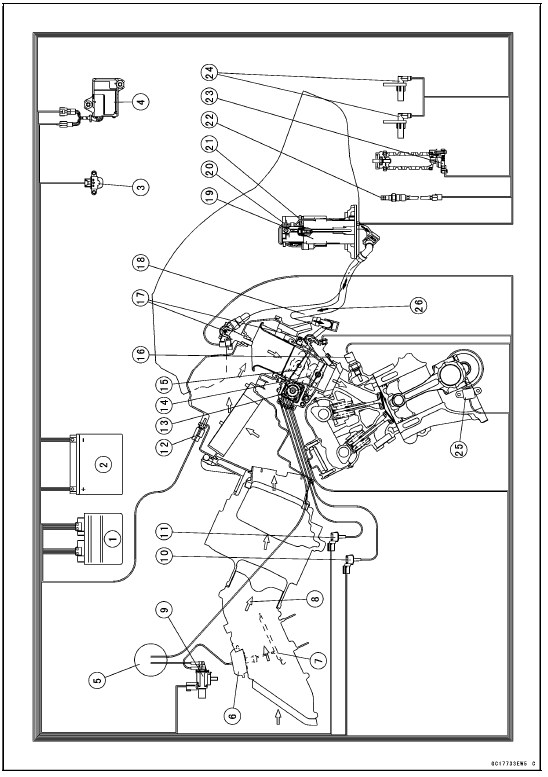
1. ECU
2. Battery
3. Vehicle-down Sensor
4. Exhaust Butterfly Valve Actuator
5. Vacuum Chamber (Other than US, CA and CAL Models)
6. Air Intake Valve Actuator (Other than US, CA and CAL Models)
7. Air Intake Valve (Other than US, CA and CAL Models)
8. Air Flow
9. Air Intake Solenoid Valve (Other than US, CA and CAL Models)
10. Intake Air Pressure Sensor #2
11. Intake Air Pressure Sensor #1
12. Intake Air Temperature Sensor
13. Subthrottle Valve Actuator
14. Main Throttle Sensor
15. Subthrottle Sensor
16. Water Temperature Sensor
17. Fuel Injectors
18. Primary Fuel Hose
19. Fuel Pump
20. Fuel Filter
21. Pressure Regulator
22. Oxygen Sensor (Equipped Models)
23. Gear Position Switch
24. Wheel Rotation Sensors
25. Crankshaft Sensor
26. Fuel Flow
 Exploded View
 DFI System Wiring Diagram
Crankshaft Removal
Split the crankcase (see Crankcase Splitting).
Remove:
Connecting Rod Big End Nuts [A]
Connecting Rod Big End Caps [B]
NOTE
Mark and record the locations of the connecting rods
and their big end caps so that they can be reassembled
in their original positions.
Remove the crank ...
Front Caliper Removal
Remove:
Bolt [A]
Front Wheel Rotation Sensor [B]
Loosen the banjo bolt [C] at the brake hose lower end,
and tighten it loosely.
Unscrew the caliper mounting bolts [D], and detach the
caliper [E] from the disc.
NOTICE
Do not loosen the caliper assembly bolts [F]. Take
out only ...
Chassis Parts Lubrication
Before lubricating each part, clean off any rusty spots with
rust remover and wipe off any grease, oil, dirt, or grime.
Lubricate the points listed below with indicated lubricant.
NOTE
Whenever the vehicle has been operated under
wet or rainy conditions, or especially after using a
high ...