
The yellow light functions as the electronic steering damper warning indicator.
The light and warning symbol "ESD" go on if there is a malfunction in the electronic steering damper system.
However, this could also be caused by trouble with the charging system (e.g.
battery). If the warning light comes on, check the battery to be sure it is fully charged. If the battery is fully charged and the warning light still goes on, have the electronic steering damper system checked by an authorized Kawasaki dealer.
The electronic steering damper system maintains the last damping force setting if it fails.
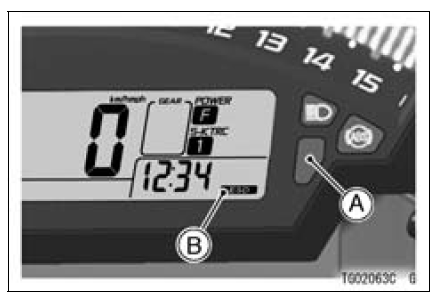
A. Yellow Warning Indicator Light
B. Electronic Steering Damper Warning Symbol
 KIBS Warning Indicator Light (For models equipped
with KIBS)
KIBS Warning Indicator Light (For models equipped
with KIBS) ABS Indicator Light (For models equipped with KIBS)
Wheels
Tubeless tires are installed on the
wheels of this motorcycle. The indications
of “TUBELESS� on the tire side
wall and the rim show that the tire and
rim are specially designed for tubeless
use.
A. “TUBELESS� Mark
A. “TUBELESS� Mark
The tire and rim form a leakproof unit
by ...
Headlight Bulb Replacement
Turn the cover [A] counterclockwise, and remove it.
Disconnect the headlight connector [A].
Open the clamp [B], and remove the bulb.
NOTICE
When handling the quartz-halogen bulb, never
touch the glass portion with bare hands. Always
use a clean cloth. Oil contamination from hand ...
Exploded View
CL: Apply cable lubricant.
EO: Apply engine oil.
G: Apply grease.
HG: Apply high-temperature grease.
L: Apply a non-permanent locking agent.
M: Apply molybdenum disulfide grease.
R: Replacement Parts
S: Follow the specified tightening sequence.
Specifications
Special ...