
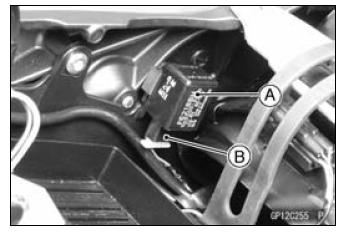
Turn Signal Relay [A] Turn Signal Lights [B] 12 V Battery [C]
If the lights do not blink as specified, replace the turn signal relay.
Testing Turn Signal Relay 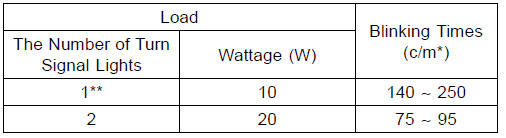
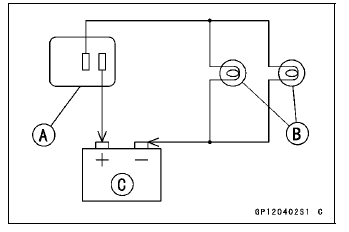
(*): Cycle(s) per minute
(**): Corrected to “one light burned out�.
Turn Signal Light Circuit
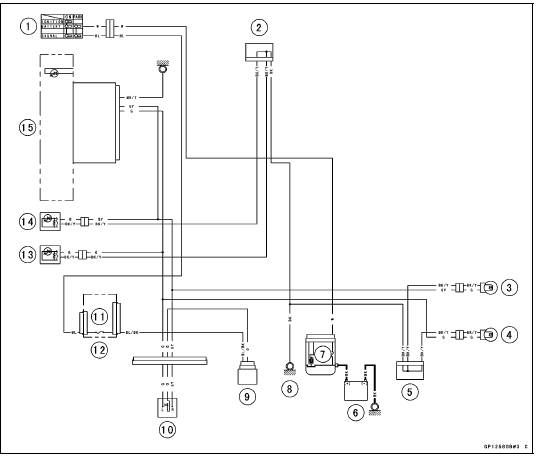
1. Ignition Switch
2. Joint Connector A
3. Rear Right Turn Signal Light 12 V 10 W
4. Rear Left Turn Signal Light 12 V 10 W
5. Joint Connector B
6. Battery
7. Main Fuse 30 A
8. Frame Ground
9. Turn Signal Relay
10. Turn Signal Switch
11. Turn Signal Relay Fuse 10 A
12. Fuse Box 1
13. Front Left Turn Signal Light (LED)
14. Front Right Turn Signal Light (LED)
15. Turn Signal Indicator Light (LED)
 Rear Turn Signal Light Bulb Replacement
 Air Switching Valve
Wiring Diagram (US, CA and CAL with KIBS Models)
ZX1000KC
ZX1000KD
...
Fuses
Fuses are arranged in the fuse boxes
located under the passenger’s seat and
in the left fairing. The main fuse is
located under the passenger’s seat.
If a fuse fails during operation, inspect
the electrical system to determine
the cause, and then replace it with
a new fuse of proper amp ...
Exploded View
HG: Apply high-temperature grease.
HO: Apply heavy oil.
L: Apply a non-permanent locking agent.
MO: Apply molybdenum disulfide oil solution.
(mixture of the engine oil and molybdenum disulfide grease in a weight ratio
10:1)
R: Replacement Parts
Specifications
Special Too ...