
Special Tools - Jack: 57001-1238 Jack Attachment: 57001-1608
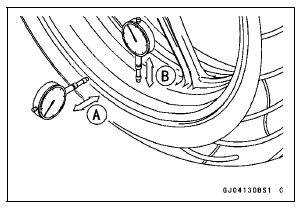
If roughness or binding is found, replace the hub bearings (see Hub Bearing Removal/Installation).
If there is any damage to the wheel, replace the wheel.
If rim runout exceeds the service limit, check the hub bearings (see Hub Bearing Inspection).
If the problem is not due to the bearings, replace the wheel.
Rim Runout (with tire installed) Standard: Axial TIR 0.5 mm (0.02 in.) or less
Radial TIR 0.8 mm (0.03 in.) or less
Service Limit: Axial TIR 1.0 mm (0.04 in.)
Radial TIR 1.0 mm (0.04 in.)
| WARNING Damaged wheel parts may fail and cause an accident resulting in serious injury or death. Never attempt to repair a damaged wheel part. If the wheel part is damaged, it must be replaced with a new one. |
 Rear Wheel Installation
 Axle Inspection
Balance Adjustment
If the wheel always stops in one position, provisionally
attach a balance weight [A] on the rim at the marking using
adhesive tape.
Rotate the wheel 1/4 turn [B], and see whether or not the
wheel stops in this position. If it does, the correct balance
weight is being used.
If the whe ...
Piston Ring, Piston Ring Groove Wear Inspection
Check for uneven groove wear by inspecting the ring seating.
The rings should fit perfectly parallel to groove surfaces.
If not, replace the piston and all the piston rings.
With the piston rings in their grooves, make several measurements
with a thickness gauge [A] to determine pisto ...
General Information
All rights reserved. No parts of this publication may be reproduced, stored
in a retrieval system, or
transmitted in any form or by any means, electronic mechanical photocopying,
recording or otherwise,
without the prior written permission of Quality Assurance Division/Motorcycle &
Engin ...